RN-QQHFzQYtPGkUCfyu8eve2qf0

Saturday, 19 May 2012

Secure your Google Chrome with Password

0 comments
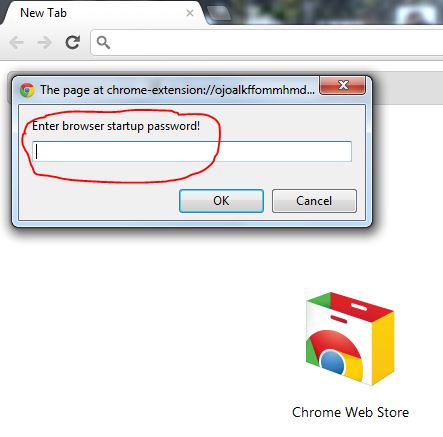
We can protect our Google Chrome with Password. We can secure Saved Password, Important Bookmarks, etc... with this "Simple Password Startup" Extension. So let's see how to secure Google Chrome with password.


Secure your Google Chrome with Password


Install the "Simple Password Startup" Extension in your Chrome
Click here to Install
Then go to "Tools" --> "Extension" --> "Simple Password Startup" --> "Option"
After that Enter a Password and Save it.
Now your Google Chrome is secured with Password.


Secure your Google Chrome with Password
If you want to open your Google Chrome, every time you have to type the password in home page. If you type a wrong password, Chrome will be closed. Without knowing the password we can see only the "Home page" in chrome.


Secure your Google Chrome with Password

This is a very easiest way to protect your "Saved Password" and "Bookmarks" from unknown persons.

Note: Don't forget your Startup password, if you forget the password, you can't recover it.


Monday, 14 May 2012

How to Disable Windows Store feature in Windows 8

0 comments
Microsoft has introduced windows 8 recently. In windows 8 a new feature is introduced, that is known as windows store. If we need we can disable this feature. 

How to Disable Windows Store feature in Windows 8

How to do this

Press Windows key + R
In the appearing window, type gpedit.msc
Hit "Enter"
Then in the appearing window select "User ConfigurationAdministrative TemplatesWindows Components"
Now "Windows Components" --->  Store  ---> Double Click on "Windows Store" 

In next appearing window, Select "Enabled"
Then Click on "OK"


How to Disable Windows Store feature in Windows 8

Friday, 11 May 2012

Picture Codes For Facebook Chat

0 comments
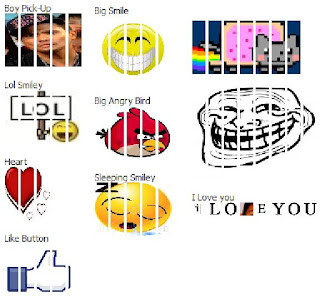
These simple image codes will make your chatting more attractive.

Picture Codes For Facebook Chat


Bored Face

[[267256390039141]] [[267256386705808]] [[267256400039140]] [[267256396705807]] [[267256393372474]]
[[267256506705796]] [[267256513372462]] [[267256503372463]] [[267256510039129]] [[267256500039130]]
[[267256596705787]] [[267256600039120]] [[267256590039121]] [[267256593372454]] [[267256603372453]]
[[267256670039113]] [[267256666705780]] [[267256680039112]] [[267256673372446]] [[267256676705779]]
[[267256766705770]] [[267256756705771]] [[267256760039104]] [[267256750039105]] [[267256753372438]]


[[243146722453811]] [[243146719120478]] [[243146715787145]] [[243146725787144]]
[[243146729120477]] [[243146852453798]] [[243146862453797]] [[243146859120464]]
[[243146849120465]] [[243146855787131]] [[243146929120457]] [[243146939120456]]
[[243146932453790]] [[243146935787123]] [[243146919120458]] [[243147005787116]]
[[243147012453782]] [[243147002453783]] [[243147015787115]] [[243147009120449]]
[[243147112453772]] [[243147105787106]] [[243147119120438]] [[243147109120439]]


Crying Baby

[[364775970245338]] [[364775976912004]] [[364775973578671]] [[364775980245337]] [[364775983578670]]
[[364776090245326]] [[364776093578659]] [[364776100245325]] [[364776096911992]] [[364776086911993]]
[[364776163578652]] [[364776173578651]] [[364776166911985]] [[364776170245318]] [[364776176911984]]
[[364776253578643]] [[364776240245311]] [[364776246911977]] [[364776250245310]] [[364776243578644]]
[[364776326911969]] [[364776336911968]] [[364776340245301]] [[364776330245302]] [[364776333578635]]
[[364776426911959]] [[364776413578627]] [[364776423578626]] [[364776416911960]] [[364776420245293]]
[[364776496911952]] [[364776486911953]] [[364776493578619]] [[364776490245286]] [[364776500245285]]


Shocked Face

[[219028968214894]] [[219028974881560]] [[219028971548227]] [[219028981548226]]
[[219028978214893]] [[219029128214878]] [[219029114881546]] [[219029118214879]]
[[219029121548212]] [[219029124881545]] [[219029231548201]] [[219029234881534]]
[[219029221548202]] [[219029224881535]] [[219029228214868]] [[219029304881527]]
[[219029311548193]] [[219029308214860]] [[219029298214861]] [[219029301548194]]
[[219029411548183]] [[219029408214850]] [[219029404881517]] [[219029401548184]]


[[364951610227774]] [[364951613561107]] [[364951600227775]] [[364951606894441]]
[[364951603561108]] [[364951736894428]] [[364951726894429]] [[364951740227761]]
[[364951733561095]] [[364951743561094]] [[364951880227747]] [[364951886894413]]
[[364951883561080]] [[364951876894414]] [[364951890227746]] [[364951983561070]]
[[364951990227736]] [[364951986894403]] [[364951980227737]] [[364951976894404]]
[[364952140227721]] [[364952136894388]] [[364952143561054]] [[364952146894387]]


Smile Face

[[355539484500073]] [[355539491166739]] [[355539481166740]] [[355539477833407]] [[355539487833406]]
[[355539607833394]] [[355539601166728]] [[355539597833395]] [[355539604500061]] [[355539611166727]]
[[355539707833384]] [[355539711166717]] [[355539714500050]] [[355539704500051]] [[355539701166718]]
[[355539814500040]] [[355539821166706]] [[355539807833374]] [[355539811166707]] [[355539817833373]]
[[355539937833361]] [[355539931166695]] [[355539934500028]] [[355539927833362]] [[355539941166694]]
[[355540051166683]] [[355540041166684]] [[355540044500017]] [[355540037833351]] [[355540047833350]]


Sad Face

[[343520805715022]] [[343520812381688]] [[343520819048354]] [[343520815715021]] [[343520809048355]]
[[343520922381677]] [[343520912381678]] [[343520919048344]] [[343520915715011]] [[343520925715010]]
[[343520995715003]] [[343520992381670]] [[343520999048336]] [[343521005715002]] [[343521002381669]]
[[343521102381659]] [[343521099048326]] [[343521092381660]] [[343521095714993]] [[343521109048325]]
[[343521219048314]] [[343521212381648]] [[343521222381647]] [[343521225714980]]

Monday, 16 April 2012

Remove Spam E-mails Automatically

0 comments
Today G-mail takes a prominent place in mailing service. This provides it's latest feature frequently. One of its feature is removing spam mails automatically. Spam mails carry virus, therefore they enter our PCs efficiently. Most of the people don’t read such mails, they just delete or ignore it without opening.


Remove spam E-mails Automatically
For the ease of the user, this could be easily removed automatically by following the method,

Log into your G-mail account, go to Gmail “Settings”.

Then in “Filter” window, select a “Create a new filter”.

In the appearing window, in the “Has the Words” box, type “in:spam”, 
click on the “Create Filter with this Search ”, and click “Ok”.

Tick “Delete it” and tick “Also apply filter to 0 matching conversations” in the appearing window.

Then click “Create Filter”.

That's all !!!

Today's Bonus Post :
Click here to Speed Up Internet 20% - 30% Without using Any Software

Monday, 9 April 2012

Check who else connected on your Wi-Fi

1 comments
Anyone can access internet through your wireless network, but this is not identical. To identify this, “Wireless Network Watcher” is been introduced.


Check who else connected on your Wi-Fi

Wireless Network Watcher is a utility that scans the wireless network and shows a list of all PC and devices connected to your wireless network. For any computer or device that is connected to your network,
The following information will be displayed.


IP Address
MAC Address
The company that manufactured the network card
Optionally the computer name


Friday, 6 April 2012

How to Block Unwanted Website on your PC

0 comments
Now internet has became a very important part in everyone's life. Internet gives us the good things and as well as the bad things. So, we can block this kind of websites from our computers permanently or for a particular time period. We can block these websites by using the software called “FocalFilter”. You can install this software on your computer and follow the below mentioned steps to block those kinds of websites for a particular time period.

How to Block Unwanted Website on your PC


Note: Microsoft’s.NET same work needs to operate this software. And make sure this is installed in your computer.

Install the FocalFilter software and click on Edit my site list.

A window will appear, in that window type the website addresses which you want to block. And then click on Save.

After that another window will display, in that, click on popup menu (near to “Block four”) and select the time. Then click on Block my site list. 

Tuesday, 27 March 2012

What is Inside RAR, Zip Files? How to Check Without Downloading

0 comments
Mostly viruses can into the computer through compressed file format (Zip, RAR). The reason for this is, we cannot see or identify anything and even cannot see what is in the compressed file. To avoid this problem we can install a particular extension on Firefox.

Check RAR, Zip files, without Download

We can see the file what is inside the Zip, RAR and we can download the necessary file. And also, we can see zip, RAR file online without downing anything.


Click here to Install Arch View

Saturday, 17 March 2012

Unlock USB modems within 60 seconds

0 comments
When unlocking USB modems, people go to certain PC repairing shops and pay high amount of money to get their USB modems unlocked, but to triumph over this problem, there is a program called “DC Unlocker”.
Unlock USB modems within 60 seconds 

DC unlocker is a program specialized for data card unlocking. It is easy to use and very fast, it takes just only 5-60 seconds to unlock.

Few features

New models are being added regularly.
Free updates.
Doesn't need any cable or adapters.
No needs to select any COM ports, auto detect function.


Wednesday, 14 March 2012

Check whether the Anti-Virus works or not in Computer

0 comments
Nowadays there is no one without using computers. Those who are using computers have a problem, that is virus attack.

To protect our computer from viruses we should install Antivirus. We people doesn't know how much this Antivirus protect our computer from viruses. Sometimes Antivirus will not work or it can’t identify the new viruses. If there is a situation like this, the viruses will attack your important data.


So let us check whether your computer’s antivirus works properly or not.


Check whether the Anti-Virus works or not in Computer

How to check whether the Antivirus works or doesn't work?

Open a Notepad and copy the following code.

X5O!P%@AP[4\PZX54(P^)7CC)7}$EICAR-STANDARD-ANTIVIRUS-TEST-FILE!$H+H* 

Save it as fake-virus.exe

If your Antivirus works properly, the file you saved will be identified as virus and it will be deleted by your Antivirus. If your antivirus doesn't work properly, the file you saved will not be identified as virus.
Therefore, if your file get deleted you can know that your antivirus works without any trouble.

Monday, 12 March 2012

Protect your Passwords in Cyber cafes

0 comments
Although internet has reached every place, still there are people who access internet in Cyber cafes. Some people regularly go to Cyber cafes to access internet, while others access only in certain time when they are in an urgent need.

Most of the Cyber cafes use several methods to steal your passwords. My suggestion for writing this article is by my bad experience at a Cyber cafe.

Protect your Passwords in Cyber cafes


Two days ago, when I had an urgent need to check my mail at Cyber cafe. I logged into my account through Mozilla Firefox. When I logged in, a pop out window appeared with a message “save the password”, “not now”, “never for this site” and I selected “not now”, because I already know that the passwords can be viewed in Firefox which I have shown you in

After checking my mails, I logout and fortunately I checked the saved passwords in Firefox.
I was shocked!!!

Because even my Email username and password was saved. Even though I selected not to save my password earlier, my password had been saved by some sort of trick in that Cyber cafe.

This is the screenshot that I took at the moment in that Cyber cafe, even my password is included here :(

Protect your Passwords in Cyber cafes


To protect your passwords while accessing internet in Cyber cafes, do the following tricks.

Trick 01

Use “Onscreen Keyboard” to type your Username and Password but sometimes virus or key logger may have disable “Onscreen Keyboard”. In this case, you have to use the below trick.


Trick 02

This trick is to confuse key logger.
Suppose if you want to login “Gmail” with the following Username and Password.


Username - fazlul001
Password – Pa$$w0rd

Now just open “Notepad” and enter your password with some random characters in between as shown below.
Protect your Passwords in Cyber cafes


And now just copy the appropriate characters (password) into login box using “mouse” and login to your account.
This trick will definitely cheat the key logger installed in PCs at Cyber cafes.


Some other tips to be safe at cyber cafes.

Whenever you access internet in any other PC, make sure that the PC is up to date with latest Antivirus and Anti spyware programs to avoid Trojans. 

Delete the “History” in the web browser. 

Make sure that you are properly logout.