RN-QQHFzQYtPGkUCfyu8eve2qf0

Sunday, 6 January 2013

Top 3 Free Online Tools to Check Website Loading Time

0 comments
Here today I'm gonna write a post for bloggers. If you have a website or blog, you have to concentrate on many thing to keep your valuable readers. In this list one of the most important thing is page load time. If your blog/website takes more time to load the page, definitely you will lose huge number of traffic. So you must concentrate on your blog/website page loading time. Here I'll list you the best 3 websites to check page load time in online.


Top 3 Free Online Tools to Check Website Loading Time


Pingdom is the most popular tool to check website/ blog load time.


02. Web page test
This is another trusted online tool to check the page load time. You can check the page load time from different locations and different browsers.


03. Page Speed
This free online page load time checker has been developed by Google. Also this tool gives you suggestions to make your website/blog faster.


Top 10 Most Expensive Domain Names of 2012

0 comments
This summary is not available. Please click here to view the post.

Sunday, 30 December 2012

Comparing the Internet: 2002 vs 2012 [Infographic]

0 comments
Hello friends, I don't want to expalin anything about internet's needs today. I can simply describe the internet as "The world can't revolve without internet connection".
So here I"ll provide you an infographic which shows you the comparison between 2002 vs 2012.


Comparing the Internet: 2002 vs 2012 [Infographic]


The Internet: 2002 vs 2012 [Infographic]

Social Media And The Internet 10 Years Later
Source: Media Bistro

Saturday, 22 December 2012

What are the Top Searches of World with Google in 2012

0 comments
We are so close to the end of 2012. Here today we have a short look on what were the top topics the whole world searched in 2012. According to the Search giant report, totally 1.2 trillion searches has been done on Google in 2012 worldwide. Here I have listed you,
Top 10 Trending Searches
Top 10 Images search
Top 10 Athletes
Top 10 Events
Top 10 People
Top 10 Feature Films
Top 10 Artists search
Top 10 TV Shows
Top 10 Gadget searches
Top 10 Airlines


Check the short video of Zeitgeist 2012: Year In Review


Top 10 Trending Searches
Whitney Houston
Gangnam Style
Hurricane Sandy
iPad 3
Diablo 3
Kate Middleton
Olympics 2012
Amanda Todd
Michael Clarke Duncan
BBB12


Top 10 Images search
One Direction
Selena Gomez
iPhone 5
Megan Fox
Rihanna
Justin Bieber
Harry Styles
Minecraft
Nicki Minaj
Katy Perry


Top 10 Athletes
Jeremy Lin
Michael Phelps
Peyton Manning
McKayla Maroney
Junior Seau
Sarah Burke
Tom Daley
Lance Armstrong
Mario Balotelli
Ryan Lochte


Top 10 Events
Hurricane Sandy
Kate Middleton Pictures Released
Olympics 2012
SOPA Debate
Costa Concordia crash
Presidential Debate
Stratosphere Jump
Penn State Scandal
Trayvon Martin shooting
Pussy Riots


Top 10 People
Whitney Houston
Kate Middleton
Amanda Todd
Michael Clarke Duncan
One Direction
Felix Baumgartner
Jeremy Lin
Morgan Freeman
Joseph Kony
Donna Summer


Top 10 Feature Films
The Hunger Games
Skyfall
Prometheus
The Avengers
Magic Mike
John Carter
Ek Tha Tiger
Paranormal Activity 4
Taken 2
Dark Shadows


Top 10 Artists search
Whitney Houston
Michael Clarke Duncan
One Direction
Donna Summer
Lana Del Ray
Carolina Dieckmann
Dirk Bach
Carly Rae Jepsen
Michel Telo
LMFAO


Top 10 TV Shows
BBB12
Avenida Brasil
Here Comes Honey Boo Boo
The Voice
American Idol
Game of Thrones
Homeland
Revenge
Cheias de Charme
Carrossel


Top 10 Gadget searches
iPad 3
Samsung Galaxy S3
iPad Mini
Nexus 7
Galaxy Note 2
Play Station
iPad 4
Microsoft Surface
Kindle Fire
Nokia Lumia 920


Top 10 Airlines
Southwest Airlines
United Airlines
American Airlines
Delta Airlines
Air France
Lufthansa
British Airways
JetBlue
Air Canada
US Airways

Source: Zeitgeist 2012

Monday, 17 December 2012

Top 10 Most Searched Topics in 2012

0 comments
Hi everyone,
2012 is gonna end within few days. So lets have a small look on the hot topics of 2012 in internet. Recently Bing has released a report about most searched topic in 2012. According to this report Apple- iPhone 5 is most searched topic by people in 2012. After this hot topic, presidential elections and London Olympics have got the second and third position. 


Top 10 Most Searched Topics in 2012


Here I'll give you the top 10 list of Most searched topics in 2012.

1. iPhone 5
2. 2012 elections
3. 2012 Olympics
4. Hurricane Sandy
5. “Honey Boo Boo” reality show
6. “Gangnam Style” dance
7. KONY 2012
8. Academy Awards
9. Kindle Fire HD
10. Facebook IPO

Saturday, 8 December 2012

How to Get Google Search Results from Not yet Visited Websites

0 comments
Here is a cool tip about Google search. We are using google search engine to promote our every problems related to PC and some other general things. I can simply describe this as follows
"Google has answers for everything".

So let's see one of google search secret. It's how to get Google search result from not yet visited websites. This trick will help you in many situation, if you're in deep search of a particular topic when doing college assignments, this trick will helpful to you.


How to get Google search result from not yet visited websites?

Go to Google.com
Search for something.
Click on Search Tools. 
Then click All results.
Finally select Not yet visited.


How to Get Google Search Results from Not yet Visited Websites

Note: 
When you start again searching on google, it will show you results from only not yet visited sites.
And you need to sign into Google account to enable this option. Also Web History should be in Enabled.

Monday, 3 December 2012

How to Speedup Internet with Top 10 Public DNS Servers

1 comments
Hi guys,
Today let's see about another working internet speedup trick. There are many tips and tricks available to speedup the internet connection. Already we have discussed many tricks to speedup internet connection. Today we will see how to speedup internet connection with top 10 high speed DNS servers.

Nowadays DNS servers have become a most important part in internet connection's speed. Sometimes you might see dongle's strength is in very good condition but the internet speed would be less. This all happen because of DNS servers. 
When you are using the default DNS provider from your ISP, it will be a slow access. You can speedup internet connection by using high speed DNS providers. 


How to Speedup Internet with Top 10 Public DNS Servers

Here I have listed you the top 10 high speed public DNS servers.

TOP 10 DNS SERVERS

Level3:
Preferred DNS server - 209.244.0.3
Alternate DNS server - 209.244.0.4

Google:
Preferred DNS server - 8.8.8.8
Alternate DNS server - 8.8.4.4

ScrubIT3:
Preferred DNS server - 67.138.54.120
Alternate DNS server - 207.225.209.77

OpenNIC4:
Preferred DNS server - 69.164.208.50
Alternate DNS server - 216.87.84.211

Public-Root5:
Preferred DNS server - 199.5.157.131
Alternate DNS server - 208.71.35.137

Comodo DNS:
Preferred DNS server - 8.26.56.26
Alternate DNS server - 8.20.247.20

OpenDNS:
Preferred DNS server - 208.67.222.222
Alternate DNS server - 208.67.220.220

DNS Advantage:
Preferred DNS server - 156.154.70.1
Alternate DNS server - 156.154.71.1

Norton DNS:
Preferred DNS server - 198.153.192.1
Alternate DNS server - 198.153.194.1

SmartViper:
Preferred DNS server - 208.76.50.50
Alternate DNS server - 208.76.51.51


How to Speedup Internet connection with Top 10 High Speed Public DNS Servers?

Go to Control Panel
Then go to Network and Sharing Center
Click on Local Area Connection


Then click on Properties


After that, Select Internet Protocol Version 4 (TCP/IPv4) and click on Properties 
                                               OR
Double Click on Internet Protocol Version 4 (TCP/IPv4)


Now click on Use the following DNS addresses and change it as follows. Use any of above mentioned public DNS servers.

For exmple:


Then click on OK,
That's all you have done successfully !!

How to Check Whether a Website is Up or Down?

0 comments
There are thousands of websites available in internet today. Already I have discussed about this in a previous post. Click here to know the Total Number of Websites in the World.

Today's post is about active websites and dead websites. We can divide websites into two types, first one is active websites and the second is dead websites. So lets see how to check whether a website is up or down.


How to Check Whether a Website is Up or Down?


How to check?

Go to DownForEveryoneOrJustMe

Now just type the web address in the search box which you want to check.
After that, hit Enter.


Now it will check automatically whether the particular website is up or down and give you the result within few seconds.


If it shows you the particular site is up, then the site is active. And if it show you the particular site is down, then the site is dead or unavailable.

Saturday, 1 December 2012

Opera Mini 7.5 Released for Fastest Browsing on Android

0 comments
All of us know Opera company has designed Opera mini for web browsing on mobile phones. Now Opera has released it's new version of Opera mini for all the Android users. This new version is named as Opera mini 7.5 and now available to download in Google Play Store. This new version has come with some latest features and many bugs have been fixed from it's previous version. Get the new version and feel the fastest web browsing on your Android devices.


Opera Mini 7.5 Released for Fastest Browsing on Android


Click Here to Download Opera Mini 7.5

Wednesday, 28 November 2012

Is the Internet Bad for Your Heath? [Infographic]

0 comments
Internet has become a most important fact in our daily life. It takes a prominent place in today’s fast moving world. There is no place without internet connection and it connects millions of people into a small circle around the world. Internet has changed many people's way of communication, learning and play skills. 

So let's have a small look on how the internet effects our health. Below attached simple infographic shows you how the internet effects our health.

Is the Internet bad for your health?


Is the Internet bad for your health?

Source : Visual.ly

Wednesday, 14 November 2012

Top 30 Highest Earning Websites in 2012

0 comments
Online Market is one of the most famous method to make money. All the website owner's dream is to take their site into top and earn some money through it. In this list, today we will see the top 30 websites which has earned the most money in 2012. In this top 30 ranking, Google has ranked #1 most money earning website of 2012 and Amazon and Yahoo ranked in next 2nd, 3rd positions.


Top 30 Highest Earning Websites in 2012

Here Top 30 Websites.


1. Google 
Founders : Larry Page and Sergey Brin
Income per sec :$691.29
Average income of the year :$22,000,000,000


2. Amazon
Founders : Jeff Bezos
Income per sec :$607.05
Average income of the year :$19,200,000,000

3. Yahoo
Founders : Jerry Yang and David Filo
Income per sec :$228.31
Average income of the year :$7,200,000,000

4. eBay
Founders : Pierre Omidyar
Income per sec :$199.45
Average income of the year :$ 6,300,000,000

5. Msn/Live
Founders : Nathan Myhvoid
Income per sec :$102.00
Average income of the year :$ 3,200,000,000

6. Paypal
Founders : Luke Nosek, Max Levchin and Peter Thiel
Income per sec :$71.40
Average income of the year :$2,250,000,000

7. iTunes
Founders : Jeff Robin
Income per sec :$60.00
Average income of the year :$1,900,000,000

8. Rueters
Founders : Marshal Vace
Income per sec :$60.00
Average income of the year :$1,900,000,000

9. Priceline
Founders : Jesse Fink
Income per sec :$59.6
Average income of the year :$1,850,000,000

10. Expedia
Founders : Added Mark Schroeder
Income per sec :$46.00
Average income of the year :$1,450,000,000

11. NetFlix
Founders : Reed Hastings
Income per sec :$38.00
Average income of the year :$1.100.000,000

12. Travelocity
Founders : Terry Jones
Income per sec :$38.00
Average income of the year :$1.100.000,000

13. Zappos
Founders : Nick Swinmurn
Income per sec :$31.70
Average income of the year :$1,000,000,000

14. Hotels.com
Founders : David Litman
Income per sec :$31.70
Average income of the year :$1,000,000,000

15. AOL
Founders : Erik Prince
Income per sec :$30.50
Average income of the year :$960,000,000

16. Orbitz
Founders : Jeff Katz
Income per sec :$28.00
Average income of the year :$870,000,000

17. Overstock
Founders : Robert Brazell
Income per sec :$27.00
Average income of the year $834,000,000

18. Myspace
Founders : Tom Anderson
Income per sec :$25.00
Average income of the year $800.000.000

19. Skype
Founders : Niklas Zennstrom
Income per sec :$18.00
Average income of the year : $550,840,000

20. Sohu
Founders : Zhang Chaoyang
Income per sec :$14.00
Average income of the year: $430,000,000

21. Buy.com
Founders : Robb Brock
Income per sec :$12.68
Average income of the year : $400,000,000

22. StubHub
Founders : Eric Baker
Income per sec : $13.00
Average income of the year : $ 430,000,000

23. Alibaba
Founders : Jack Ma
Income per sec : $10.00
Average income of the year: $315,000,000

24. Facebook
Founders : Mark Zuckerberg
Income per sec :$9.50
Average income of the year : $300,000,000

25. YouTube
Founders : Chad Hurley, Jawed Karim and Steve Chen
Income per sec :$9.50
Average income of the year : $300,000,000

26. Blue Nile
Founders : Mark Vadon
Income per sec :$9.40
Average income of the year: $295,000,000

27. Tripadvisor
Founders : Stephen Kaufer
Income per sec :$8.20
Average income of the year : $ 250,000,000

28. Getty Images
Founders : Mark Getty
Income per sec :$7.40
Average income of the year : $230,000,000

29. Bidz
Founders : Garry Itkin
Income per sec :$6.70
Average income of the year : $200,000,000

30. NYTimes
Founders : Henry Jarvis Raymond
Income per sec :$6.00
Average income of the year : $175,000,000


Monday, 5 November 2012

Check Whether your Username is Available or Not in Famous Social Networks

0 comments
Today lets talk about Username, if you are an internet user, you must have a username for you. Because if you want to register on some websites to do your personal works, the particular website will ask you to enter a username. Nowadays every internet users have a unique username to identify them from others.

Sometime when you are trying to register on a website you might get a message from the particular website that your username is already taken, try another one. So today we will look at whether your username is available or not on some famous social network sites.


Check Whether your Username is Available or Not in Famous Social Networks

Knowem is one of the best free online tool to check whether your username is still available or not on 500+ social networking sites. This free tool will show you the result within few steps that your username is available or not famous social networking sites.


How to Check?

Go to Knowem

Just enter your username in scan box.

And now click on Check It


Check Whether your Username is Available or Not in Famous Social Networks

That's all, now Knowem will check your username on 500+ social networking sites and give you the result within few seconds. 

Monday, 29 October 2012

How to Speed Up Internet with High Speed DNS Server

0 comments
Hey guys, today i came with another internet speedup trick without using any software. Before doing this, complete the following tricks. These tricks have been already posted on my blog. So do these all tricks and get the maximum benefits from it.

First, speedup your internet connection 20%- 30% without using any software. To do this, click the below link.
Speed up Internet Connection 20%- 30% Without Using Any Software

After that do this, it's about how to speed up internet connection using cmd. To do this click the below link.

How to Speedup Internet Connection Using CMD


How to Speed Up Internet with High Speed DNS Server

Finished doing the above mentioned tricks? OK !! then now lets see about today's post. Today we will see how to speedup internet connection by doing some changes in DNS.

We can call DNS as phone book of the web, this gives you all the details of the domain name to your browser. When you are using the default DNS provider from your ISP, it will be a slow access. You can speedup internet connection by using high speed DNS providers.


How to do this?

Go to Control Panel

Then go to Network and Sharing Center

Click on Local Area Connection

How to Speed Up Internet with High Speed DNS Server

Then click on Properties

How to Speed Up Internet with High Speed DNS Server

After that, Select Internet Protocol Version 4 (TCP/IPv4) and click on Properties
                                               OR
Double Click on Internet Protocol Version 4 (TCP/IPv4)


How to Speed Up Internet with High Speed DNS Server

Now click on Use the following DNS addresses and change it as follows.

Preferred DNS Server : 208.067.222.222
Alternate DNS Server : 208.067.220.220

                                OR
Preferred DNS Server : 8.8.8.8
Alternate DNS Server : 8.8.4.4


How to Speed Up Internet with High Speed DNS Server

Then Click on OK, That's all. Now your internet connection will speedup with high speed DNS server.

Wednesday, 24 October 2012

What to Do When The Internet is Down? (A Funny Infographic)

0 comments
Internet takes a prominent place in today’s fast moving world. There is no place without internet connection. Due to some situations, your internet connection might get down. So here a simple info-graphic describe that how a normal person act when the internet is down. Even I can't spend a day without internet connection :). This info-graphic is designed by Glitch.


What To Do When The Internet is Down?


Source : Visual.ly

Saturday, 13 October 2012

How to Speed Up Internet Connection Without Any Software

0 comments
Internet takes a prominent place in today’s fast moving world. there are people who are completely addicted to it, but the problem that we all face today in using internet is Speed. internet itself got lots of software to improve its speed, but how many of those actually work perfectly? your reply would be simply "NO"


How to Speed Up Internet Connection Without Any Software

How would you feel if I tell you a way to increase the speed of your internet connection without any software or expenses? There is a simple windows trick available to do this task easily.
Already I have given you a trick to Speed Up Internet 20% - 30% Without Any Software. Don't miss to read it.

How to Speedup Internet Without Any Software?

Right Click on My Computer

Click on Properties

Then click on Device Manager


How to Speed Up Internet Connection Without Any Software


Now Device Manager window will appear

In this, Double Click on PORTS (COM & LPT)


How to Speed Up Internet Connection Without Any Software  


Then, Double Click on Comunications Port


How to Speed Up Internet Connection Without Any Software


Now select Port Settings tab


How to Speed Up Internet Connection Without Any Software


Change Bits per second value to 128,000
And change the flow control to hardware


How to Speed Up Internet Connection Without Any Software

Now Click on OK

That's all, you have done !!! And when you browse the internet again, definitely you will feel the difference in speed.

Monday, 1 October 2012

Top 10 Most Visited Websites in 2012

0 comments
Hi guys, today I came with an another interesting title.
Day to day huge amount of websites are being created by internet users. There are currently more than 525 million websites available in internet. Already I have discussed this in 
How many websites in the World? article. But all the websites are never excepted as a successful website by internet users. If you want to create a successful website, think something differently to attract it's users and specially avoid Ctrl C --> Ctrl V, that means don't steal anyone's content or idea.


Top 10 Most Visited Websites in 2012

In this list we'll look at on which are the most lovable websites by internet users in 2012? This ranking has been taken based on Alexa Global traffic rank.

So here I'll list first 10 most visited websites by internet users in 2012.


Top 10 Most Visited Websites in 2012


Facebook.com
Alexa rank : 1
Founder : Mark Zuckerberg
Industry type :  Social networking service


Google.com 
Alexa rank : 2
Founder : Larry Page ,Sergey Brin
Industry type : Search engine 


Youtube.com
Alexa rank : 3
Founder: Steve Chen, Chad Hurley,Jawed Karim
Industry type : Video hosting

Yahoo.com
Alexa rank : 4
Founder : Jerry Yang, David Filo
Industry type : Internet

Baidu.com
Alexa rank : 5
Founder : Robin le
Industry type : Chinese search engine


Wikipedia.org
Alexa rank : 6
Founder : Jimmy Wales, Larry Sanger
Industry type : Online Encyclopedia

Live.com
Alexa rank : 7
Founder : Microsoft
Industry type : Software based

Twitter.com
Alexa rank : 8
Founder :  Dick Costolo
Industry type : Social network

Qq.com
Alexa rank : 9
Founder : Tencent Holdings Limited
Industry type : Instant messaging

Amazon.com
Alexa rank : 10
Founder : Jeff Bezos
Industry type : Online retailing

Friday, 21 September 2012

How to Take Screenshot of any Websites Without any Software

0 comments
There are lots of free software and online services available to take screenshot of any websites. Due to educational need or some other reasons you might want to take screenshot of websites. So you may have installed some website capture software in your PC like DuckLink, WebKut or Web SnapShot to complete your task.

To do these kind of simple works, if you install a software on your PC, it'll be just waste of hard disk space and also it can make your PC slowdown by taking higher processor usage.

So in this tutorial I'll show you how to take complete screenshot of any websites without using any software. This will make your work very easy.


How to Take Screenshot of any Websites Without any Software


Lets see how to take screenshot of any websites without using any software.
There is a option available in the web browsers to take complete screenshot.


For Firefox users

If you're using Firefox as your web browser, you can simply install the FireShot Add-on into Firefox and start capturing any websites.

Click here to Install FireShot


For Chrome users

If you're using Chrome as your web browser, you can simply install the Screen Capture extension into Chrome and start capturing any websites.

Click here to Install Screen Capture

Sunday, 16 September 2012

How to Access Blocked Websites Without Using any Software

0 comments

Hii everyone, today's tutorial is about how to access blocked website without using any software.

Already i have given a simple trick, to access blocked websites, 
Click here to read Simple Trick to Access Blocked Websites (Facebook, YouTube, etc...)

When I'm browsing internet at college, the biggest headache is always getting error messages while trying to access some famous websites, like Facebook, Twitter or YouTube.

I'm 100% sure, you might have also felt the same headache while trying to access the above mentioned websites at college or office. This is what you do when you get error messages.

You will go to Google search and start to type how to access blocked websites. Google is your best friend, because it knows many solutions for your single problem and it will show you a large number of working and not working tricks as result.


How to Access Blocked Websites Without Using any Software

I have also did many googling and tried to find a way to access blocked websites. Finally i found an awesome trick to access blocked websites without using any software. And i'll share that trick with you all, i hope this trick will be useful to you while accessing websites at college or office. This trick is called as Bypass URL Filtering for Access Blocked Websites.


Lets see how to access blocked websites without using any software.

Go To Start -> Run -> In Run box type cmd and hit Enter

Now Open Command Prompt window will appear

In command prompt type Ping websites Address and Enter
For Example : If you want to access Facebook, type as follows
ping facebook.com

Now a IP Address will appear in command prompt to access facebook.com


How to Access Blocked Websites Without Using any Software

After then type the particular IP Address (which appears in your command prompt) in address bar and open any websites. Now you can access any websites by using this simple method.

Note : This trick works depending on your college's or office's security measures.

Thursday, 13 September 2012

How Famous Websites Looked when they Launched

0 comments
When you connect PC to internet, definitely you'll go any of below mentioned websites.
Google
Facebook
YouTube
Yahoo
Wikipedia
Twitter
...
True or not?
So today's article is about your favorite websites. Let's have a small look on famous websites, how looked when they were first launched.

Google.com - Launched in 1996


Facebook.com - Launched in 2004


YouTube.com - Launched in 2005


Yahoo.com - Launched in 1994


Twitter.com - Launched in 2006


Wikipedia.org - Launched in 2001


Amazon.com - Launched in 1995


Apple.com - Launched in 1987 (The screenshot from 1996)


News.bbc.co.uk - Launched in 1997


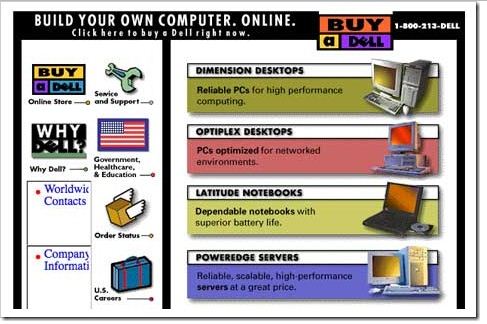
Dell.com - Launched in 1996


Msn.com - Launched in 1995


Nytimes.com - Launched in 1995


Flickr.com - Launched in 2004


Telegraph.co.uk - Launched in 1994


Here, last one and my favorite website. My site is running under this Platform, Its blogger. Blogger.com - Launched in 1999 


Today's Bonus Post :
How to Speed Up Internet Using Command Prompt