RN-QQHFzQYtPGkUCfyu8eve2qf0

Sunday, 19 August 2012

Enable Google Multiple Account Login in Same Browser

0 comments

We all know that Google developer team has introducing lots of new features everyday for Google lovers.
They have introduced Google rolling out multiple account sign-in feature for Google users. Now you can login to multiple account at the same time. Most of us have more than one account for several different reasons. So hereafter you don't need to use different web browsers for logins.


How to Enable Google Multiple Account Login in Same Browser
How to Enable this feature

While you login to your account make sure to tick “Stay signed in” check box.


Go to this page and click enable this feature.


How to Enable Google Multiple Account Login in Same Browser

After that, you can add multiple accounts in the appearing window.

Note : Do not enable this feature on public computers.


Friday, 17 August 2012

Increase Downloading Speed Up to 10 Times in Firefox

0 comments

Most of the internet users are using Mozilla Firefox as their web browser. So 
I'm gonna give a very useful tip for Mozilla Firefox users. 
If your doing all the internet stuff on Firefox such as download songs and videos, this post will be useful to you. Today i'll give you FireDownload for high speed download in Firefox. You don't need to install any download manager software for fast download in Firefox. 


Increase Downloading Speed up to 10 Times in Firefox
This FireDownload Add-on will helps you to boost download speed up to 10 times higher than normal downloads in Firefox.

Already i have given you Firefox Booster to Speed Up Firefox. This freeware will helps you to increase the speed in Firefox and FireDownload Add-on will helps you to increase the download speed in Firefox, so you can enjoy maximum :)

Click Here to Download FireDownload

After install FireDownload, restart your Firefox web browser once and enjoy the maximum download speed.


Wednesday, 15 August 2012

How to Use VLC as Video Converter

0 comments

VLC is one of the popular software for play video files. How many of you know that we can convert video files with VLC player. We are using different video converters to convert video files. Hereafter you don't need to download or purchase a separate software for video converting. I'll show you an easiest way to convert videos with VLC Media player.


Use VLC as Video Converter

Lets see how to convert videos using VLC media player.

On VLC Player Click Media

Select Convert/Save

You can select a video file to convert by clicking Add button

Now click on Convert/Save

A window will appear, in that window click on Browse and select a path to save the converted video file.

You can choose output video format under the Settings area.


Use VLC as Video Converter


Finally, click on Start
That's all !!!

Thursday, 9 August 2012

Microsoft Released "Fix It" to Fix Windows Errors Automatically

0 comments

Microsoft has released a portable troubleshoot application to fix some common Windows errors and issues. This application fixes all the errors automatically with one click.
You don't need any separate software to solve your Windows errors. You can fix lots of common errors with Fix It such as Aero interface issues, computer power consumption issues and hardware detection issues etc... 


Microsoft Released "Fix It" to Fix Windows Errors Automatically
Run the EXE file after downloading, it will download the complete Fix It tool for your system. After download completes you can start Fix It portable version by clicking "Launch Fix it.exe"

Click Here to Download 
Fix It portable version

Already i have given you XP Quick Fix for Windows XP users and 7 Quick Fix 2.0 for Windows 7 users. 


XP Quick Fix can solve 25 common problems with one click.
Click here to read Solve 25 common problems in Windows XP with one Software,


7 Quick Fix 2.0 can fix 100+ common problems with one click.
Click here to read Fix 100+ Windows 7 Errors and Problems with one Software


Monday, 6 August 2012

Speed up Internet using Command Prompt

0 comments

Today for all the computer user's major problem is slow internet access. We are using many softwares and tricks to speed up our internet connection. But how many of these softwares and tricks makes us satisfy?

So today I'll give you such a nice trick to speed up your internet connection using command prompt. Already i have given you a post about Speedup Internet without any Software. Don't miss to read it.
Click here to read Speed Up Internet 20% - 30% Without any Software


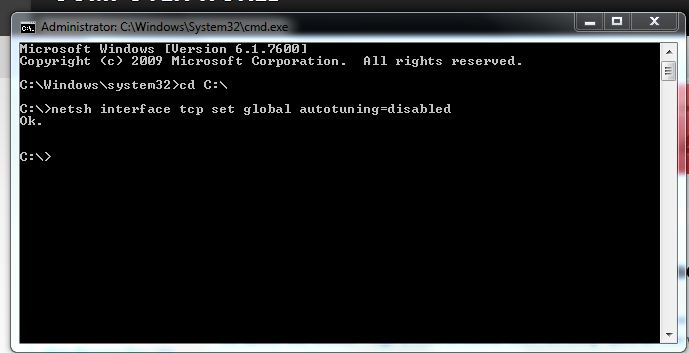
Speed up Internet using Command Prompt
Note :
Check your Internet speed test on www.scanmyspeed.com before start this trick. Then, again you can check the new internet speed and feel the difference of this awesome trick.


How to Speedup Internet connection using Command Prompt

Click on Start
Type cmd in Search program and files box (Run cmd as Administrator)
Now command prompt will appear
In command prompt go to root directly "C:\" ( type cd C:\ )
Now type netsh interface tcp set global autotuning=disabled


Speed up Internet using Command Prompt

Press Enter. That's all, you have Done !!!

Now check the internet speed on www.scanmyspeed.com and feel the difference. If this article is useful, Put your comments and share with it your friends.


Sunday, 5 August 2012

Download Opera 12.01, Latest Version Released

0 comments

We are using many different web browsers to surf fast internet on the web. Opera is one of the fastest web browser. Huge amount of internet lovers are using Opera as their web browser for surf fast internet access.
Opera supports more than 40 languages and works with Windows, Mac, Linux.

Now Opera has released their latest version Opera 12.01 for all the web surfer. Opera's Previous versions were contain some security bugs, crashes, freezers and bad NSL issues. All the issues has been corrected in this latest version.


Download Opera Latest Version


Click Here to Download Opera 12.01

Saturday, 4 August 2012

Google Page Rank Updated. Check your Website Rank Now

0 comments

Regularly Google updates website's page rank once in every 3 months. Previously Google has updated page rank on 3rd May 2012. Exactly after 3 months it has updated new website page rank on 3rd August 2012. By using Google Page rank you can determine the importance or relevance of websites.
If a page appear at the top of the search result, particular website will get higher page rank.

Google page rank in mainly based on backlinks and page rank measure from 0-10. The more quality backlinks can get higher page rank easily.


Google Page Rank Updated on August 2012. Check your Website Rank Now

If you want to improve your website or blog search engine ranking, you must improve your Google page rank by buliding a high quality backlinks.
So Google page rank is very important to your website or blog. Do you have a website or blog? If you have, you can check your Google page rank for free on below mentioned sites.


Check Your Website Page Rank

PrChecker
This is a famous online tool to check website's Google page rank. And it allow you can add Google page rank widget to your website or blog.

Check Page Rank
Check page rank is another popular tool to check website's Google page rank.

Page Rank
You can check many websites and blogs Google page rank at one time by using Page Rank

Whats my PageRank
Whats my PageRank is another popular site to check Google page rank.

GetRank
This site allow you to check Google page rank and add stylish ranking widget to your website or blog.

Best 5 Websites to Download Your Laptop Drivers

0 comments


Do you have the latest Laptop? and did you get "Driver CD" while purchasing?


Day to day Laptop manufacture companies are introducing latest technologies with every new release. As a result of this latest laptops doesn't comes with "Driver CD", Mostly particular laptop drivers will be copied in hard disk. Sometimes you may have lost your laptop drivers because of virus attacks or any other reasons.


Download Laptop Drivers For Free
So if you want to format your laptop, what you will do to install drivers?
Don't worry friends, today i'll give you best 5 websites to download drivers for your laptop.

If you have formatted your laptop, you can download the latest version of drivers for your laptop from below mentioned websites.


www.laptopdrivers.net 
You can download all your drivers from this site.

www.driverzone.com 
This is another best site to get all your notebook drivers. Almost it has more than 100,000 files. Specially you can download the drivers for even 10 year old laptops.

www.opendrivers.com

www.notebook-driver.com

www.notebookera.com

Note : First two websites are best sites to download all your laptop drivers.

Friday, 3 August 2012

How to Change the Color of Facebook

0 comments

We all know that Facebook home page is looks in blue color. How do you feel if you see your Facebook account in another color without blue?
I'll show you a method to change your Facebook color !!!
You can change the color of Facebook by using Greasemonkey Add-on in Firefox web browser. By using this Add-on you can change the color of Facebook to anything as your wish.


How to change the color of Facebook


How to change the color of Facebook


Make sure that you are logged in Firefox web browser.
Install Greasemonkey,
 Click here to install Greasemonkey Add-on
After installation, restart your Firefox once
Now go to Facebook color changer userscript page
Click on Install button which is located in top right of the page
Click on Install
Now go to Tools --> Greasemonkey --> Userscripts Commands --> Custamize facebook colors


How to change the color of Facebook

You're Done !!!  :)
Now you can change your Facebook to any color
 as your wish by using Facebook Color Changer

How to change the color of Facebook

Wednesday, 1 August 2012

Download Free E-Books Legally

0 comments

Technology has improved in every fields . How many of you agree with this?
people doesn't like to read books which is printed on papers.
Now they have started to read E-books on computer and mobile phones. This is a good effort for not wasting papers.

But mostly we cant download E-books for free on internet. We have to pay money to download those E-books.
Today I'll give you some websites to download free E-books that are available legally.