RN-QQHFzQYtPGkUCfyu8eve2qf0

Monday, 30 September 2013

How To Be Happy - Be Confident

0 comments
Do you want to be a happier person ? Just watch this video till end i beat something will change in you.You will be confident which results you to be happier.

How To Be Happy - Be Confident
**How To Be Happy - How To Be Confident**

Share This Video Among Your Friends:- http://youtu.be/PbZ1Jmwg1Yk

SUBSCRIBE:- http://www.youtube.com/subscription_center?add_user=jptv1dz

Here Are More Steps To Follow To Be A Happier Person Of This World:-

1) Always Be optimistic.
2) Own Yourself
3) Make Enough Money To Meet Basic Needs
4) Treat Your Body Like It Deserves To Be Happy
5) Always Try To Stay Close To Your Friends And Family.
6) Find Happiness In The Job You Have Now.

How To Be Happy - Be Confident
 
If you've ever wanted to be happier than you are, you're obviously not alone.Always Ask Yourself Whats the reason behind your unhappiness try to catch that mid point and try to solve it gently I promise after doing this you will be the happiest person.
   
              If You are unhappy due to your partners reason try to consult him/her express your feelings. Main point Please Don't show your attitude to your lover.

          If you are unhappy from your job why the hell you need to do that i don't think there is only one job in this world . Do the things that you love.

      If you are unhappy bzu you don't have enough money then please never give up and never try to earn more and more. Fulfill your basic needs be happy with your family why you need expansive cars and expansive this? Just to show others !!! Don't give a Fu*k on that......

Subscribe My Channel If something have changed on you after reading this :- http://www.youtube.com/subscription_center?add_user=jptv1dz

Links:-
~~~~~~~~~~~~~~~~~~~~~~~~~~~~~~~~~~~~~~~~­~~~~~~~~
http://facebook.com/suraj.pandey.3532
http://instagram.com/canugod
http://itstrickszone.blogspot.com
http://youtube.com/jptv1dz

   Share this video:- http://youtu.be/PbZ1Jmwg1Yk

Make You Android Fast By 10x:- https://www.youtube.com/watch?v=RdxnLVYNzdg&list=TLayM7DjtPSUw&index=3

Speed up youtube videos:- https://www.youtube.com/watch?v=0d8vs...

Speed up your google chrome:- https://www.youtube.com/watch?v=Pdtu0...

Epic Girl Friend Prank:- https://www.youtube.com/watch?v=aUZJz...

Thank you http://www.ravenprodesign.com/ for intro...

***Some More Tags***
 how to be happy
how to feel happy
what is happiness
happiness book
how to be happy alone
how to be confident
how to be happy in life
how to be happy in a relationship
how to be happy everyday
how to be happy being single
how to be happy quotes
how to be positive
how to be happy in life
how to be happy with yourself
how to be truly happy
how to be happy all the time
reasons to be happy

CLICK HERE TO WATCH THE VIDEO

Monday, 5 August 2013

Wifi Hacking - WEP - Kali Linux Aircrack-ng suite

0 comments
Alright, this post is written assuming you have Kali Linux up and running on your computer. If not, here is a post on hacking with kali linux. It will tell you about what Kali Linux is, and how to use it. It will guide you through installation process.
So if you are still following, then just follow these simple steps-


Firstly, create a wireless network to crack. Don't use this method on others. It is illegal. Then proceed with the steps below.

1. Find out the name of your wireless adapter.


Alright, now, your computer has many network adapters, so to scan one, you need to know its name. So there are basically the following things that you need to know-
  • lo - loopback. Not important currently.
  • eth - ethernet
  • wlan - This is what we want. Note the suffix associated.
Now, to see all the adapters, type ifconfig on a terminal. See the result. Note down the wlan(0/1/2) adapter.


2. Enable Monitor mode

Now, we use a tool called airmon-ng to  create a virtual interface called mon. Just type 
airmon-ng start wlan0
 Your mon0 interface will be created.


3. Start capturing packets

Now, we'll use airodump-ng to capture the packets in the air. This tool gathers data from the wireless packets in the air. You'll see the name of the wifi you want to hack.
airodump-ng mon0


4. Store the captured packets in a file 

This can be achieved by giving some more parameters with the airodump command
airodump-ng mon0 --write name_of_file

Now the captured packets will be stored in name_of_file.cap
You have to wait till you have enough data (10000 minimum)


5. Crack the wifi

If all goes well ,then you'll be sitting in front of your pc, grinning, finally you've got 10000 packets (don't stop the packet capture yet). Now, you can use aircrack-ng to crack the password. (in a new terminal)
aircrack-ng name_of_file-01.cap 
The program will ask which wifi to crack, if there are multiple available. Choose the wifi. It'll do its job. If the password is weak enough, then you'll get it in front of you. If not, the program will tell you to get more packets. The program will retry again when there are 15000 packets, and so on.

Note : This will not work with WPA-2. Here is a tutorial on -
Hacking wpa/wpa-2 wps with reaver on kali linux


Troubleshooting : Check this link if you failed to hack the network. 

The missing ingredient

Here is a comparatively advanced tutorial which will require you to have gone through this tutorial as well as the missing ingredient one. After you have got the big picture, you can move on to complicated things like speeding up wifi hacking.
Speeding Up WEP Hacking


Saturday, 3 August 2013

Virtual Private Networks, Another Way To Ensure Privacy

0 comments
Before we get to the interesting part, first a little bit introduction about what a VPN is -
Put simply, a Virtual Private Network, or VPN, is a group of computers (or discrete networks) networked together over a public network—namely, the internet. Businesses use VPNs to connect remote datacenters, and individuals can use VPNs to get access to network resources when they're not physically on the same LAN (local area network), or as a method for securing and encrypting their communications when they're using an untrusted public network. When you connect to a VPN, you usually launch a VPN client on your computer (or click a link on a special website), log in with your credentials, and your computer exchanges trusted keys with a far away server. Once both computers have verified each other as authentic, all of your internet communication is encrypted and secured from eavesdropping. (lifehacker)
 So basically, what happens here is that the data you send is protected from eavesdropping. It is encrypted in  a way that can't be decrypted easily. So, other than the two methods discussed earlier, VPN is a method to stay anonymous too.

What are the advantages of using a VPN?

  1. Your data is encrypted.
  2. No-one can eavesdrop your communications.
  3. Your privacy is ensured.
  4. You can pretend to be someone you are not (You wanna use some service which is banned in your country, VPN is the answer).
  5. You can overcome browsing restrictions imposed on you.

What makes a good VPN?

  1. Price - Hell yeah, it should be priced reasonably (did I forget to mention VPNs are not free of cost)
  2. Free? Yeah, there are some free VPNs too. They serve you ads and are more or less useless. They dont do what they promise. They are good for beginners though, who want to learn, and privacy is not much of a problem.
  3. They should use SSL. If you have no idea what this means, then, simply put, its the best protocol the VPNs use, and all others come next to SSL. (other protocols have their own pros and cons)
  4. Logging- Some VPNs log your data. Not good.
  5. Exit location - There must be a lot of them. That is, you can pretend to be a lot of people. Also, if there are very less exit locations, then it will affect browsing.

How VPNs work?


If you need more info, google it. I'm not going to name specific VPN service for you, all have their pros and cons. You'll have to do your homework. However, if you need reference, then lifehacker has a good article about it.

Staying Anonymous

0 comments
Alright Guys, this is the first post of this blog. But I won't waste time with formalities. But before you become a hacker, you must know how to stay anonymous online. There are various levels in which this can be done
(Note: None of these methods are completely foolproof. If you are doing something illegal, then you'll go to jail. That's it.)

Tails OS

"Tails is a live system that aims to preserve your privacy and anonymity. It helps you to use the Internet anonymously almost anywhere you go and on any computer but leaving no trace unless you ask it to explicitly."
This is what their official website has to say about it. Actually, it is nothing but an OS that comes with all applications customized for privacy and anonymity.
Thats what tails OS looks like.


How To Use
  1. Go to their official website and read the stuff there. 
  2. Download the latest version of the OS.
  3. Put it on a USB and boot.
  4. Explore the OS, and learn more about it from their documentation.
Once you are through with the documentation and have practiced enough with the OS, your identity is safe.


Tips
  1. You should have some experience with linux if you want to become a hacker. Ubuntu is good for beginners.
  2. Do not assume that you are completely anonymous. You are not.

TOR BROWSER BUNDLE

"The Tor software protects you by bouncing your communications around a distributed network of relays run by volunteers all around the world: it prevents somebody watching your Internet connection from learning what sites you visit, it prevents the sites you visit from learning your physical location, and it lets you access sites which are blocked.
The Tor Browser Bundle lets you use Tor on Windows, Mac OS X, or Linux without needing to install any software. It can run off a USB flash drive, comes with a pre-configured web browser to protect your anonymity, and is self-contained." - Official Website
If the idea of downloading a whole OS sounds boring to you, then this browser is made for you. It, however, is not as robust as tails, and its usage is limited to anonymous browsing.

    How To Use
    1. Go to their website and read the documentation.
    2. Download the latest browser bundle.
    3. Read the documentation.
    4. Install and run.
    Note:
    Browsing is annoyingly slow, since the traffic passes through three relays.

    That's all for this post. In the next post we'll talk about VPNs.


    Tuesday, 30 July 2013

    How To Make Google Chrome Faster By 5x 2014 - Jpt Videos

    0 comments
    Make Your Google Chrome Faster Then Before. By Watching This Video You Will Be Able To Increase Your Google Chrome Speed By 5X.This Is An Updated Video Of 2014 To Make Google Chrome Faster Then Before.A Best Way To Make Your Google Chrome Faster.

    Video Link;- https://www.youtube.com/watch?v=Pdtu0RrE7Co&feature=youtu.be


    SUBSCRIBE:- http://youtube.com/user/jptv1dz


    Monday, 18 March 2013

    How to Disable or Turn Off Facebook Graph Search

    0 comments
    Recently Facebook developers introduced a new feature called Facebook Graph Search for it's users. Now Facebook is allowed to active Graph Search only for limited account, those who are using Facebook in (US) English.

    This is one of the advanced search feature which is loved by most of the Facebook users. But few of Facebook users are disappointed with this Graph Search feature. If you activate Facebook Graph Search once in you account, you can't disable the new search feature again.


    How to Disable or Turn Off Facebook Graph Search


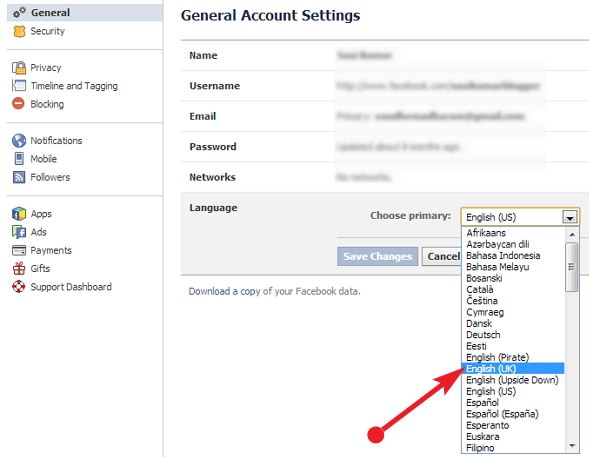
    Today I'll show you a simple trick to disable Facebook Graph Search to your account. Already I said that Facebook graph Search is only available for English (US) Facebook users. So you can simply disable Graph Search on your account by changing the current language to English (UK) or any other known languages.

    Steps to disable Facebook Graph Search

    Sign in to your Facebook Account.
    Go to Account Settings.


    How to Disable or Turn Off Facebook Graph Search

    In General Account Setting, click on Language --> Edit
    Now you have to select English (UK) or any other known language.

    How to Disable or Turn Off Facebook Graph Search

    That's all, after that click on Save Changes button. Now you have successfully disabled Facebook's Graph Search and turned back to old search bar.

    Tuesday, 12 March 2013

    Download Mozilla Firefox 19.0.2 Latest Version

    0 comments
    Mozilla Firefox released the latest version of Firefox 19.0.2. The latest version is released for all four major platforms Windows, Mac, Linux and Android. Mozilla developer team have fixed many bugs and improved higher security on this 19.0.2 version. Now users can download the latest version from Mozilla's official site. 

    Download Mozilla Firefox 19.0.2 Latest Version

    What's new and Bug fixes

    19.0.2: Security-driven release.
    Fixed stability issue.
    Built-in PDF viewer.
    Startup performance are improved.
    Added Remote Web Console.
    CSS page supports.
    Now CSS text transform is supports in full width.

    Click here to Download Firefox 19.0.2 for - Windows
    Click here to Download Firefox 19.0.2 for - Mac OS X
    Click here to Download Firefox 19.0.2 for - Linux
    Click here to Download Firefox 19.0.2 for - Android

    LinkedIn Reaches 1 Billion Endorsements [Infographic]

    0 comments
    LinkedIn team have officially announced that they having more than 1 billion endorsements in less than six months. Six month ago LinkedIn introduced a new new feature called Endorsements. With this useful feature, users can easily recommend their professional connection.


    LinkedIn Reaches 1 Billion Endorsements

    Now LinkedIn has designed an infographic to show their milestone. You can get to know more about this milestone by checking the below given infographic.


    A Bright Future For Your Kids Once You Spy iPhone Text Messages Of Theirs

    0 comments
    Texting texting texting; this habit of children is indeed a headache for all parents. The tic tac sound coming from your child’s room at all times is not their wall clock but the sound of their keypad buttons pressing while texting. Too much texting by kids from their iPhone is an irritating thing for parents and it’s not so good for your child’s health even. Excessive texting results in less sleep and creates plenty of problems for children. If parents decide to spy iPhone text messages of their kids with StealthGenie, then they can definitely change this irritating habit of their kids.

    A Bright Future For Your Kids Once You Spy iPhone Text Messages Of Theirs

    Monitoring Cell Phones:
    From anywhere in the world and at any time you want to, you may monitor the activities of your kids with the help of StealthGenie. This app is really small in size and it runs quietly inside your kid’s cell phone. StealthGenie is really user-friendly and extremely easy to use. This app does not even disrupt any feature of your kid’s cell phone while it is being installed in it.


    Suitable Phones:
    iPhone 4S and iPhone 5 are the latest iPhone models that are perfectly compatible with this app. You simply need to connect to the internet and use your log-in details to gain complete access to all the data that is stored inside the cell phone of your kids.


    SMS Messages:
    SMS messages present in the Inbox and Drafts of your child’s cell phone are shown to you by StealthGenie. Parents may even access all the SMS messages sent by children from their iPhone and may even retrieve any deleted SMS messages by them.

    Phone Data And imessages:
    All the photos and videos stored inside your kid’s iPhone are provided to you with the help of this app. Parents even get to view all the photos and videos shared by their children through imessages. Even all the text messages sent and received by kids through imessage are shown to parents.


    Child Monitoring:
    Teenage is one such time where all the habits of children tend to get attached with them for life. If you wish to make a good man of your kid, then you need to make sure that they mend their ways as early as possible. Spy iPhone text messages of your kids with StealthGenie and make sure that they don’t get on the wrong path.

    Sunday, 10 March 2013

    Google Play Celebrates 1st Birthday with Special Offers

    0 comments
    Google launched Google Play an year ago. Now it's celebrating their 1st anniversary of Google Play Store successfully. Within a period of 1 year Google Play Store has became the one of the most popular online store. You can find favorite music, movies, books and apps on Google Play Store with your Android phone and tablets. Currently it consists more than 700,000 apps, 5 million+ books and 18 million+ songs. 

    Google Play Celebrates 1st Birthday with Special Offers

    Now Google Play Store is celebrating their 1st birthday with special offers, discounts on songs, TV shows, movies and books. You can find all the offers by just visiting Google Play Store Promotional page.
    Click here to visit - Google Play Store Promotional page

    Note - All these offers are available for limited time and the offers and discounts varies by country wise.